max / 🎓 Education Perfect - Auto Answer (2026) 🎓
安装步骤: 先安装脚本管理器,再点“安装”,最后打开脚本适用的网站。
脚本来源与更新状态
以下数据来自原始来源,与本站收到的安装请求分开统计。
原始脚本: 🎓 Education Perfect - Auto Answer (2026) 🎓
来源版本: 4.0.092
最近来源检查:
最近成功检查:
- 来源站日安装量
- 0
- 来源站总安装量
- 0
- 本站安装请求
- 0
本站收到的请求不代表用户已完成安装。
点击安装只表示本站收到安装请求,不代表安装已完成。 安装后无法使用?查看问题反馈与排查
⭐ Please star the repo and check out our Github for more products ↗ GitHub
EP Answer Assistant
Full version: This branch adds MineFlare AI integration to answer and automatically complete all tasks on EP (work in progress but expect big things).
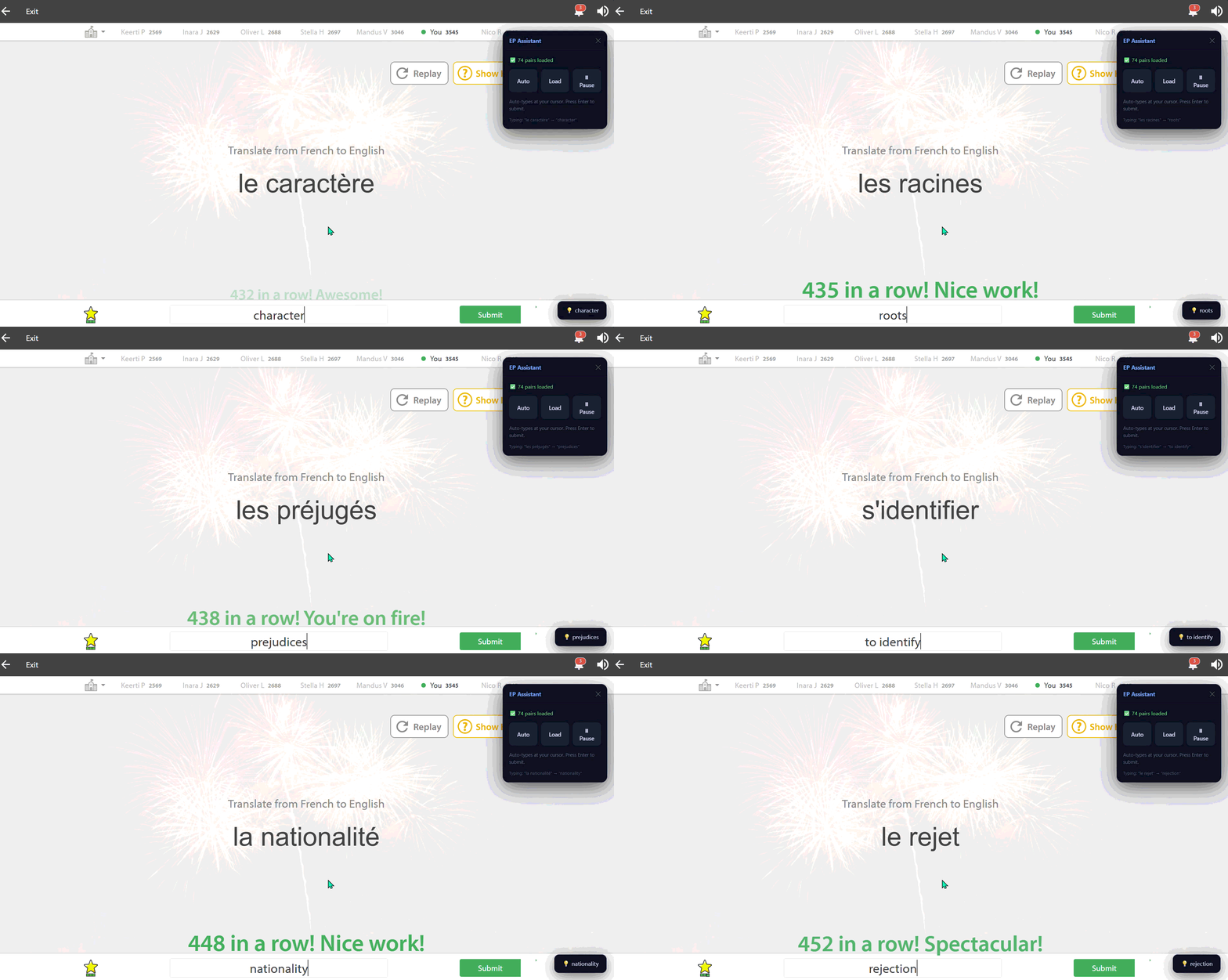
Demo
Actual speed per question is around 3-4 questions a second. The demo might not show this speed but that is just your current wifi connection
Installation
1. Install Tampermonkey and/or ViolentMonkey
Chrome/Microslop edge/operaGX/ect ect...
Firefox (linux)
https://addons.mozilla.org/en-US/firefox/addon/tampermonkey/
2. Create a New Script
- Open Tampermonkey
- Click:
Create a new script
- Replace everything with the script contents
- Save with:
CTRL + S
3. Open Education Perfect
Navigate to:
https://app.educationperfect.com/
Open a list and click:
Load
The assistant will begin automatically filling answers.
Supported Features
| Feature | Supported |
|---|---|
| Auto answer fill | Yes |
| Cursor-aware typing | Yes |
| Contenteditable support | Yes |
| Fuzzy matching | Yes |
| Angular-safe input | Yes |
| Draggable UI | Yes |
| Pause / resume | Yes |
| Live extraction | Yes |
How It Works
The script:
- Extracts pairs from the current page
- Normalizes text for reliable matching
- Detects active questions in real-time
- Finds the closest answer using fuzzy search
- Types directly into the active cursor location
- Dispatches Angular-safe input events
Architecture
┌────────────────────┐
│ Vocabulary Loader  │
└─────────┬──────────┘
          │
          ▼
┌────────────────────┐
│ Answer Map Builder │
└─────────┬──────────┘
          │
          ▼
┌────────────────────┐
│ Question Detector  │
└─────────┬──────────┘
          │
          ▼
┌────────────────────┐
│ Fuzzy Matcher      │
└─────────┬──────────┘
          │
          ▼
┌────────────────────┐
│ Cursor Typing      │
└────────────────────┘
Configuration
All configurable settings are stored in:
const CFG = {
  fuzzyThreshold : 0.60,
  typeDelay      : 20,
  toastDuration  : 3000,
  pollInterval   : 2000,
  cooldown       : 2000,
  typeCooldown   : 1500,
};
Known Limitations
- Requires the list to be visible before loading
- Extremely aggressive speed settings may cause duplicate fills
- Some custom EP activities may use unsupported input methods
Debugging
Open DevTools:
F12 → Console
The script outputs detailed logs:
[EP] Loaded 128 pairs
[EP] "bonjour" → "hello"
License
MIT License
Disclaimer
This project is provided for educational and research purposes only. We do not scrape any data from the code. Use responsibly and comply with your institution's policies. (or not its your decision be we heavily suggest it :) ).
Keywords (ignore)
- browser extension
- translation script
- language learning
- HTML parser
- JavaScript console
- word lookup
- dictionary script
- vocabulary practice
- bilingual dictionary
- text translation
- phrase translator
- web page translation
- custom glossary
- language study script
- Chrome extension
- Firefox extension
- Tampermonkey script
- userscript
- Greasemonkey
- keyboard shortcut
- F12 console
- DOM parsing
- content extraction
- regex pattern
- localization script
- multilingual support
- speech recognition
- language automation
- educational script
- research tool
- open source script
- GitHub project
- phrase matching
- fuzzy matching
- keyword extraction
- word frequency
- translation memory
- lookup table
- context dictionary
- browser automation
- text analysis
- data mining
- NLP
- natural language processing
- search terms
- language pairs
- vocabulary builder
- quick translation
- script tutorial
- auto translate
- text summarization
- document translation
- real-time translation
- offline translation
- machine translation
- neural machine translation
- statistical translation
- rule-based translation
- hybrid translation
- contextual translation
- semantic analysis
- syntax parsing
- grammatical correction
- spell checker
- language detection
- character encoding
- Unicode support
- multilingual keyboard
- input method editor
- pinyin input
- romanization
- transliteration
- phonetic script
- pronunciation guide
- audio translation
- voice to text
- text to speech
- synthetic speech
- voice recognition
- speaker identification
- accent reduction
- dialect conversion
- slang translation
- idiom translation
- colloquial language
- formal language
- technical terminology
- domain-specific language
- medical terminology
- legal terminology
- scientific vocabulary
- business language
- marketing language
- social media language
- informal chat
- emoji translation
- emoticon meaning
- cultural adaptation
- localization QA
- translation consistency
- term management
评分: 0