max / OmniDown
Install steps: Install a userscript manager, select Install, then open a website matched by the script.
Source and freshness
The following figures come from the original source and are separate from activity on this site.
Original script: OmniDown
Source version: 3.1
Last source check:
Last successful check:
- Source daily installs
- 0
- Source total installs
- 0
- OpenUserJS install requests
- 0
Requests received by this site are not proof that a user completed installation.
Clicking Install records a request on this site; it does not confirm installation. Not working after install? View troubleshooting and issues
📥 OmniDown — HD Video Downloader (YouTube, TikTok, Instagram, X & More)
OmniDown is a powerful, lightweight, and modern userscript designed to extract and download online videos, audios, and images directly from your browser. It prioritizes direct high-definition local streams and offers seamless one-click fallbacks to Cobalt.tools or dedicated converters when streams are locked by DRM, CORS, or HLS limits.



🚀 What's New in Version 3.2.1?
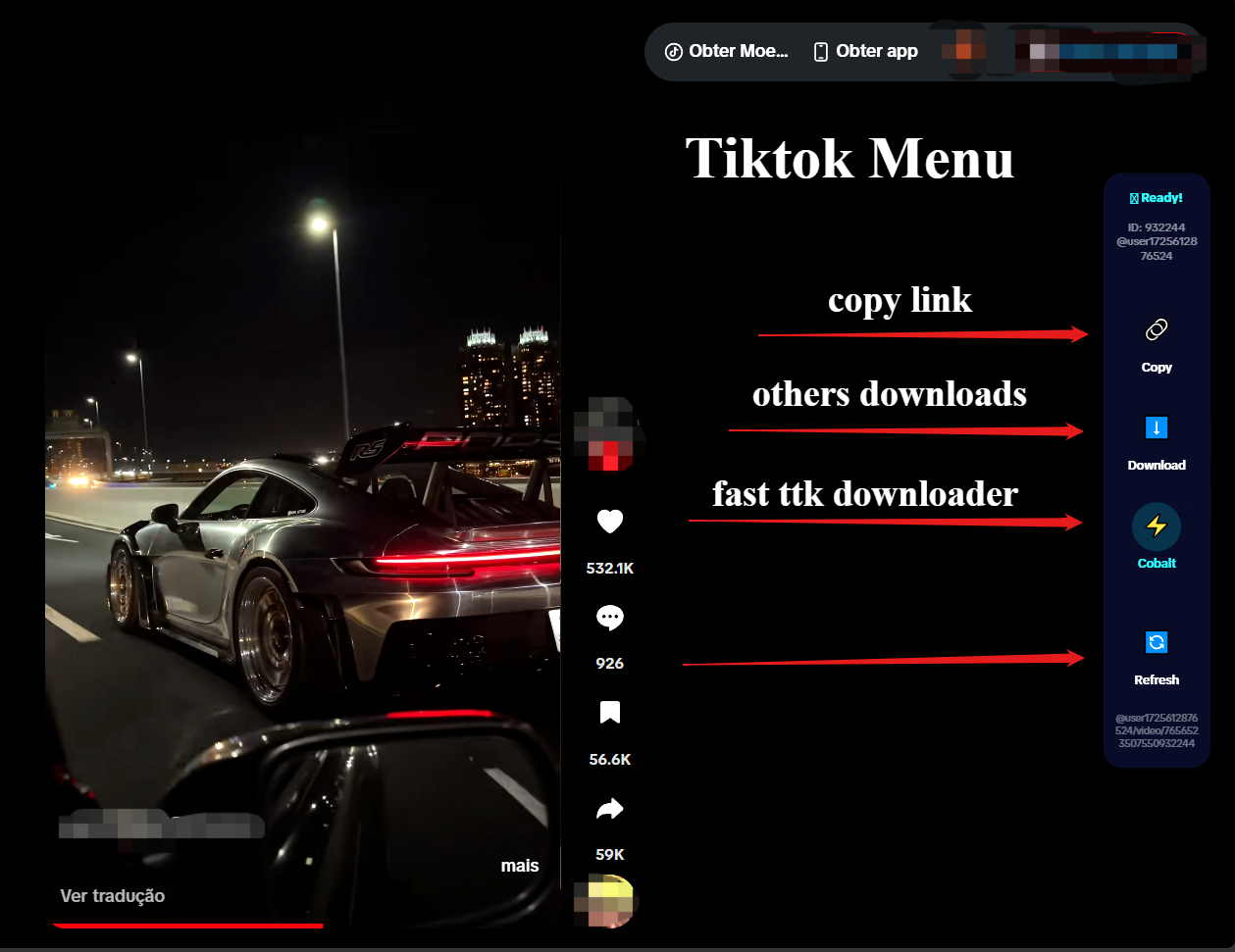
- TikTok Drawer Panel: The download menu on TikTok is now docked directly next to the control sidebar. It features a smooth, slide-out transition from behind the sidebar, straight right borders, and matches the exact height and frosted-glass style of the main controls.
- TikTok ID Polling Sync: Intercepts console player logs with a 4-second protection lock to prevent rapid scroll events from overwriting the correct active video ID.
- TikTok SPA Navigation: General URL polling keeps the sidebar, username, and video details perfectly synchronized across client-side (SPA) page changes without requiring reloads.
- Cobalt Hash Prefill Fix: Updated Cobalt redirects to pass target URLs via hash fragments (
#), enabling automated link pre-filling and download initiation on the Cobalt frontend. - Clean Link Copying (Instagram & YouTube): The "Copy Link" buttons now fetch clean post/reels page URLs (stripped of tracking metadata like
?igsh=or?utm_source=) instead of temporary, expiring CDN server links. - Minimalist YouTube View: Disabled the redundant floating action button (FAB) on YouTube, keeping the player control bar clean and focused.
📸 Interface & Layout Guide
🎵 TikTok Feed Sidebar Integration
The live sidebar automatically binds to the active video in the viewport. Clicking "Download" slides out the quality selection menu from behind the sidebar.
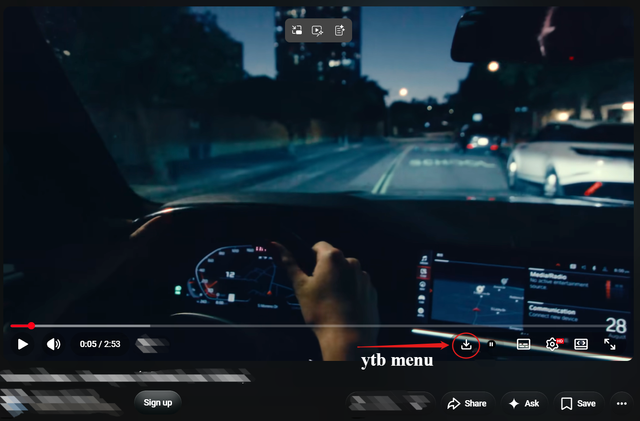
📺 YouTube Integrated Control Menu
A native vector SVG download button is injected directly inside YouTube's player control bar (ytp-right-controls).
🌐 Floating Downloader for Other Websites
On all other supported sites, a clean floating action button (FAB) appears in the bottom right corner to quickly access download options.

🌟 Supported Platforms & Features
📺 YouTube & YouTube Shorts
- Player Bar Integration: Injects a minimalist download button next to settings and captions.
- Signature Deciphering: Built-in dynamic deciphering algorithm for YouTube's
base.jsprotected streams. - n-Parameter Bypass: Resolves speed throttling automatically to download at full connection speed.
- Playlist Export: Export entire YouTube playlist URLs to a clean
.txtfile in one click. - Subtitles: Convert XML subtitles to SRT format and download them natively.
🎵 TikTok & Douyin
- Viewport Tracking: Automatically maps to the active video card using
IntersectionObserver. - API Sniffing: Hooked network requests (XHR/Fetch) capture usernames and watermark-free metadata on the fly.
- Seamless Share Link Copying: Copy clean shareable links without tracking garbage.
📸 Instagram (Reels, Posts, Stories & Carousels)
- Active Slide Detector: Scans carousel posts to identify and download the specific slide currently visible on screen.
- No-CORS Link Cleaner: Extracts and cleans the permanent Reels/Post page URL.
- HLS Stream Fallback: Detects blob streams and routes them to dedicated converters.
🐦 X (Twitter), Facebook & Threads
- Local parser extracts direct MP4 media links from page structures.
🎵 Spotify
- Quick redirect search button to fetch tracks from external audio converters.
🛠️ Download Workflows
- Direct Download (Local-First): Fetches and saves the media file directly inside your browser. It handles chunked downloading, signature solving, and shows a beautiful glassmorphic progress bar.
- Cobalt Redirection: Pre-fills and opens Cobalt's clean interface using
#parameters. Defaults tocobalt.toolsbut can be configured to any custom self-hosted instance. - External Fallback Resolver: Prompts redirection to trusted external conversion tools (like SnapTik, SSSTik, SaveFrom, FASTDL) when local streams are CORS-blocked or HLS-encoded.
🎮 Shortcuts & Customization
Ctrl + Alt + Shift + D: Open/close the download menu overlay.Esc: Close open overlays or cancel active downloads.- Tampermonkey Menu Command options:
- 🌐 Change language (English, Portuguese, Spanish, Simplified/Traditional Chinese, Vietnamese).
- ⚙️ Configure custom Cobalt API URL or custom CORS Proxy.
- 🔘 Toggle Floating Action Button visibility.
- 🔘 Toggle Auto-Redirect (instantly go to fallbacks without confirmation prompts).
🔒 Security & Privacy
- Zero Tracking: Processing runs 100% locally in your browser. No telemetry, no analytics, no third-party data tracking.
- Trusted Types Compliant: Safe from XSS injection risks, using secure DOM generation APIs (
createElement) instead of dangerous HTML parser APIs. - LRU Memory Guard: Automatic cleanup of cache maps ensures zero memory leaks when scrolling infinite feeds.
باھا: 0