max / Gartic Phone DrawBot
Install steps: Install a userscript manager, select Install, then open a website matched by the script.
Source and freshness
The following figures come from the original source and are separate from activity on this site.
Original script: Gartic Phone DrawBot
Source version: 2.0
Last source check:
Last successful check:
- Source daily installs
- 0
- Source total installs
- 0
- OpenUserJS install requests
- 0
Requests received by this site are not proof that a user completed installation.
Clicking Install records a request on this site; it does not confirm installation. Not working after install? View troubleshooting and issues
🎨 DrawBot for Gartic Phone
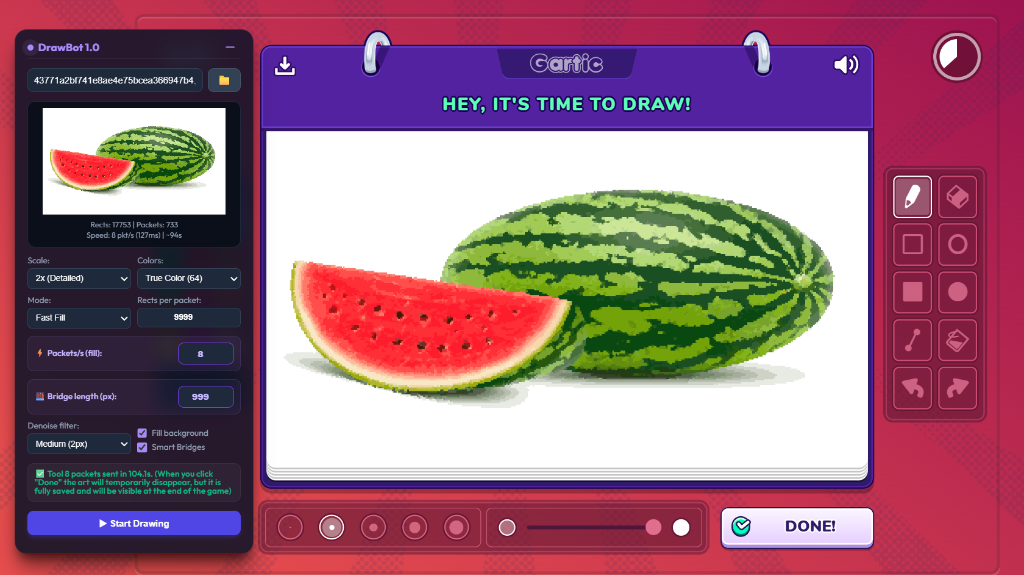
Automated drawing bot for Gartic Phone — converts any image into in-game art via WebSocket packet injection.
Language / Язык: English | Русский
🇬🇧 English
Table of Contents
- What's New in 2.0
- Features
- Requirements
- Installation
- Usage
- Settings Reference
- Drawing Modes
- How Long Does It Take?
- Tips & Recommendations
- Troubleshooting
- How It Works
What's New in 2.0
- 🫥 Invisible bridges — every color now goes out as about one packet, instead of one packet per separate spot. Drawing is 25–100× faster: a 256-color picture at 1x takes about 35 seconds instead of several minutes
- 🔲 Fine grid at 1x — at 1x the picture is drawn on cells of exactly 2×2 canvas pixels, so bridges fit everywhere and no parts go missing
- ⏱ Much faster planning — 2–9× faster; at 2x and coarser most of the work is skipped entirely. The plan made for the preview is reused when you press Start
- 🎛 Three modes —
Fast Fill,Fast Fill (old)(the pre-2.0 behaviour, kept as a fallback) andStandard Lines - 🎯 Accurate timing — packets go out 135 ms apart (at most 8 per second), and the estimate in the preview matches the real drawing time
- ⚙️ New defaults — 2x scale and True Color (32). Settings you already saved are kept
Features
- 🖼 Any image source — a local file, an image URL, Ctrl+V from the clipboard, or drag & drop onto the panel
- ⚡ Fast Fill — uses the game's own fill tool (Tool 8) and sends about one packet per color
- 🎨 Flexible colors — the game palette (18 colors), True Color with 8–256 colors, or every color as is
- 🌉 Smart Bridges — joins the remaining islands of a color through areas that are painted over later, and picks the color order that leaves the fewest islands
- 📐 Layout — stretch the image, center it, or place it in a custom box you drag and resize on the preview
- 📊 Live preview — shows the processed image, the number of rectangles and packets, and the estimated time
- 🔢 Round field — the current round is detected automatically and can be set by hand
- ⏸ Pause / Resume / Cancel at any moment, with a progress bar, the time remaining and the real sending speed
- 🛡 Send tracking — only packets that actually left are counted; failed packets are reported, and the bot stops if the connection is lost
- 💾 Saved settings — everything is stored in
localStorageand restored on the next visit - 🖱 Draggable panel with a minimize button
Requirements
- A modern browser (Chrome, Firefox, Edge, Opera)
- Tampermonkey browser extension (or any UserScript manager: Violentmonkey, Greasemonkey, etc.)
- Gartic Phone in a desktop browser
Installation
Step 1 — Install Tampermonkey
- Go to tampermonkey.net
- Click Download for your browser and install the extension.
Step 2 — Enable Developer Mode & Allow User Scripts (Crucial for Manifest V3)
To allow UserScripts to run in modern browsers:
- Open your browser's extensions page (e.g.,
chrome://extensionsin Chrome,edge://extensionsin Edge). - Toggle the Developer Mode switch in the top-right corner to ON.
- Click on the Details button of the Tampermonkey extension.
- Locate the Allow User Scripts toggle and switch it to ON.
- If prompted, grant any necessary permissions.
Step 3 — Install the Script
You can install the script automatically with a single click:
- Click this link: Install GarticPhoneDrawBot.user.js (One-Click).
- Tampermonkey will automatically open a tab displaying the script.
- Click the Install (or Update) button.
(Alternatively, you can create a new script in the Tampermonkey dashboard, copy the contents of GarticPhoneDrawBot.user.js, paste them into the editor, and press Ctrl+S).
Updating
Tampermonkey checks installed scripts for updates on its own (about once a day by default). To update right away, open the install link again and click Update, or use Check for userscript updates in the Tampermonkey menu. Your saved settings stay as they were.
Usage
Quick Start
- Open Gartic Phone and join or create a game. The DrawBot panel appears in the top-left corner
-
Wait for the drawing round and make one short brush stroke on the canvas. The status changes to
Socket ready, and the Round field shows the current round - Load an image:
- click 📁 to pick a local file, or
- paste an image URL into the text field, or
- press Ctrl+V anywhere on the page to paste an image from the clipboard, or
- drag an image file (or an image from another tab) onto the panel
Rects: 41250 | Packets: 33 — Speed: 8 pkt/s (135ms) | ~5s
✅ Drawing completed, or use ⏸ Pause / ⏹ Cancel at any timeThe image can be loaded before the drawing round, for example while the others are still writing. The plan is made for the canvas size seen last time and is redone automatically when the game canvas appears.
Important Notes
- ⚠️ Make at least one manual brush stroke before starting. It lets the bot catch the game connection, the message format and the current round
- After the bot finishes and you click Done, the drawing may disappear from your screen — this is normal. It is saved on the server and shows up in the album at the end of the game
- Transparent parts of an image (PNG with alpha) are not drawn
- Don't draw by hand while the bot is working
Settings Reference
| Setting | What it does | Default | Recommended |
|---|---|---|---|
| Scale | Size of one image pixel. 1x is the most detailed, 15x the coarsest. In Fast Fill the drawing time depends on the number of colors, not on the scale |
2x | 1x–3x |
| Colors |
Game palette (18) uses only the game's colors. True Color (N) picks the best N colors for the image. No limit keeps every color (photos can have thousands, so it is slow) |
True Color (32) | True Color (32–64) |
| Mode |
Fast Fill, Fast Fill (old) or Standard Lines, see Drawing Modes
|
Fast Fill | Fast Fill |
| Rects per packet | Max rectangles in one packet (fill modes only, up to 24000; both 12000 and 24000 were accepted in a live game). Bigger colors are split into several packets | 12000 | 12000 |
| Layout |
Stretch fills the whole canvas, Center keeps the proportions, Custom Scale lets you drag and resize a box on the preview (or use the sliders), then click Apply & Render Preview
|
Stretch | — |
| Round | Current round, counted from 1 as in the game. Detected automatically; typing a number switches Auto off | Auto | Auto |
| Packet delay (ms) | Pause after each packet in Standard Lines mode | 127 | 127 |
| ⚡ Packets/s | Sending speed in the fill modes, at most 8: faster sending gets packets dropped by the server. A 10 ms margin is added (8/s → 135 ms between packets) | 8 | 8 |
| Denoise filter | Repaints lone pixels that have fewer than 1/2/3 neighbours of the same color with the most common neighbouring color. White is never changed | Off | Off or Weak |
| Fill background | Fills the whole canvas with the most common color first, then skips that color | Off | On for images with a solid background |
| Smart Bridges | For colors that invisible bridges could not join completely, connects the islands through areas painted over later and searches for the best color order (fill modes only) | On | On |
Drawing Modes
| Mode | How it draws | Packets | When to use |
|---|---|---|---|
| Fast Fill | Fill rectangles (Tool 8). All spots of a color are linked into one tree with invisible zero-size bridges | about 1 per color | Always, by default |
| Fast Fill (old) | The same rectangles without invisible bridges, as before 2.0. Only Smart Bridges join spots | one per separate spot, 25–100× more | If parts of the drawing go missing in the album |
| Standard Lines | Pen strokes and rectangles (Tools 1 and 6), one or two packets per shape | thousands | If fill packets stop working in the game |
How Long Does It Take?
In Fast Fill one packet goes out every 135 ms, so the time is roughly number of colors × 0.135 s (plus about 1 s for the background), whatever the scale:
| Colors | Approximate time |
|---|---|
| Game palette (18) | ~3 s |
| 32 | ~5 s |
| 64 | ~9 s |
| 256 | ~35 s |
Very large colors (over 12000 rectangles, usually at 1x) take an extra packet each. The preview always shows the exact packet count and time for the current image.
Tips & Recommendations
- Best quality: 1x–2x and True Color (64–256). With Fast Fill this costs only seconds
- Fastest: fewer colors. The game palette or True Color (8–16) draws in 1–3 seconds
- Noisy image: turn on the Denoise filter (Weak or Medium)
- Image with a plain background: turn on Fill background — the largest color then costs one packet
- Placing a small picture: choose Layout → Custom Scale and drag the box on the preview
- Minimize the panel with ➖ while the bot is drawing
Troubleshooting
| Problem | What to do |
|---|---|
WebSocket not found! |
Make one brush stroke on the canvas by hand. If it doesn't help, refresh the page and try again |
Enter the Gartic Phone drawing mode first! |
Start only when the drawing canvas is on screen |
| The drawing is missing in the album | The round may be wrong: uncheck Auto next to Round and enter the round number shown by the game |
| Parts of the drawing are missing | Switch to Fast Fill (old). If that doesn't help, lower Rects per packet (try 1000) or Packets/s (try 6–7) |
Could not load image for a link |
Many sites don't allow other pages to read their images. Download the image and load it with 📁, or copy it and press Ctrl+V |
⚠ … packets failed to send |
The connection was unstable; draw again on a new round or lower Packets/s |
| Start waits a moment before sending | The plan is being made (up to ~2 s at 1x with many colors). Normally it is ready from the preview |
How It Works
Architecture Overview
DrawBot is a Tampermonkey UserScript that runs entirely in the browser, inside the Gartic Phone page. It:
- Captures the WebSocket connection to the game server
- Converts the image into a grid of color indices
- Plans the drawing — rectangles, links between them and packets
- Sends the packets directly through the captured WebSocket at a steady rate
WebSocket Interception
The script patches WebSocket and WebSocket.prototype.send at document-start, before the game loads:
-
Socket capture — the first outgoing game message (
42[...) links the socket to the bot -
Message prefix — the game's channel prefix (e.g.
42[2,7,) is taken from outgoing messages, so the bot keeps working if it changes -
Round tracking — incoming and outgoing packets carry the round number (
turnNum/t), which every drawing packet must contain. It is 0-based in packets and shown from 1 in the panel -
Stroke IDs — every drawing action has a
strokeId. Bot strokes use a random range above 100000 that never goes backwards within a round and restarts when the round changes, so they never collide with the game's own strokes
Image Processing Pipeline
-
Grid — the image is drawn onto a grid of
768/scale × 448/scalecells, according to the Layout. At 1x such cells would be 1.9–2 px on the game canvas (about 1516×848), and rounding would make some rows and columns 1 px wide, where invisible bridges cannot attach. So at 1x in Fast Fill the grid is half the canvas size instead, with cells of exactly 2×2 px (1–5% fewer cells, not visible) - Color quantization:
- Game palette: each pixel gets the nearest of 18 game colors (redmean color distance)
- True Color (N): shades are merged into clusters by frequency; for images with over 4096 distinct colors near-identical shades are merged first. Free palette slots are then filled with the colors that are worst represented, followed by 3 K-Means passes
- No limit: all colors are used as they are
Drawing Engine
Fast Fill (Tool 8)
A Tool 8 packet holds one color and a list of rectangles. The game only accepts a packet that forms a single tree: every rectangle must touch its parent with an end, strictly inside the touched side, without overlapping anything. A contact exactly at a corner, an overlap, or a part that touches nothing gets the whole packet rejected. This is what the planner builds:
- Background (optional) — the most common color fills the whole canvas (sent twice, because the first fill packet is sometimes dropped)
-
Rectangles (
findMaximalRectangleOpt) — each color's area is covered with large rectangles; for each one, "right then down" and "down then right" are tried and the bigger is kept -
Tree (
buildRectangleTreeDFS) — touching rectangles are linked parent to child in DFS order. Each separate spot of the color becomes its own tree -
Invisible bridges (
linkIslandsWithInvisibleBridges) — the trees are linked into one with rectangles of zero width or height, which paint nothing:
- first straight bridges between neighbouring rectangles in the same row or column of the grid;
- then L-shaped bridges for spots that share no line with the rest: along a row to a turn, then along a column to the main part (or the other way round).
Bridges run strictly inside grid lines and never cross each other. The search is limited to the color's bounding box and uses sorted lists with binary search, so it stays fast even at 1x
- Smart Bridges and color order — only if a color is still in pieces after that (rare since the 2×2 grid). The draw order is chosen greedily, from the last color backwards, so that each color is left with as few islands as possible (on a downsampled grid for large images). Then a multi-source BFS inside the color's bounding box connects its islands through pixels of colors drawn later, which paint over the bridge. The result is kept only if it does not add packets
-
Packets (
splitIntoChunks) — a tree bigger than Rects per packet is cut along whole subtrees, so every packet is a connected tree that starts with a real rectangle. A frame is also capped at 700,000 characters
Fast Fill (old) skips steps 4 and the 2×2 grid: every spot that Smart Bridges can't join goes out as a separate packet.
Standard Lines (Tools 1 & 6)
-
Rectangles (
findMaxRectangles) — rectangles of at least 2×2 cells become Tool 6 packets -
Paths (
findPaths) — the remaining thin lines are traced, preferring to keep the direction, and simplified (simplifyPath). Each path is a Tool 1 start packet plus one move packet - The pen width is
scale × 4 − 2pixels; Packet delay is waited after every packet
Network Protocol
Every drawing packet looks like this:
42[2,7,{"t":round,"d":action,"v":[tool, strokeId, ...]}]
-
Tool 1 — pen:
[1, id, [color, width, 10], x, y], then a move packet ("d":3) with the point deltas -
Tool 6 — rectangle:
[6, id, [color, width, 10], x1, y1, x2, y2] -
Tool 8 — fill:
[8, id, [color, 10], x, y, w, h, parent, x, y, w, h, parent, ...], whereparentis the position of the parent rectangle in the list × 5. Packets of up to 24000 rectangles (~440 KB) were accepted
Timing & Safety
- Pacing — before each fill packet the bot waits until 135 ms have passed since the previous one (at 8 packets/s). Timer lateness is measured and subtracted from the next wait, so the real speed stays at ~7.4 packets/s and matches the estimate
- Web Worker timers — timers run in a Worker, so they are not throttled when the tab is in the background
- Send tracking — a send is retried up to 3 times; only packets that actually left the socket are counted. Failed packets are reported at the end, and the bot stops with an error if the connection is lost
🇷🇺 Русский
Содержание
- Что нового в 2.0
- Возможности
- Требования
- Установка
- Использование
- Описание настроек
- Режимы рисования
- Сколько времени занимает рисование
- Советы и рекомендации
- Решение проблем
- Как работает бот
Что нового в 2.0
- 🫥 Невидимые мосты — каждый цвет теперь уходит примерно одним пакетом, а не отдельным пакетом на каждое пятно. Рисование в 25–100 раз быстрее: картинка на 256 цветов в 1x рисуется примерно за 35 секунд вместо нескольких минут
- 🔲 Мелкая сетка на 1x — на 1x рисунок строится из клеток ровно 2×2 пикселя холста, поэтому мосты помещаются везде и части рисунка не пропадают
- ⏱ Намного более быстрое планирование — в 2–9 раз; на 2x и крупнее большая часть работы вообще пропускается. План, построенный для превью, используется повторно при нажатии Start
- 🎛 Три режима —
Fast Fill,Fast Fill (old)(поведение до 2.0, оставлено как запасной вариант) иStandard Lines - 🎯 Точное время — пакеты уходят раз в 135 мс (не больше 8 в секунду), и оценка в превью совпадает с реальным временем рисования
- ⚙️ Новые настройки по умолчанию — масштаб 2x и True Color (32). Уже сохранённые настройки не меняются
Возможности
- 🖼 Любой источник картинки — локальный файл, ссылка на изображение, Ctrl+V из буфера обмена или перетаскивание на панель
- ⚡ Fast Fill — использует инструмент заливки самой игры (Tool 8) и отправляет примерно один пакет на цвет
- 🎨 Гибкая работа с цветами — палитра игры (18 цветов), True Color на 8–256 цветов или все цвета как есть
- 🌉 Умные мосты — соединяют оставшиеся островки цвета через области, которые позже закрасятся, и подбирают порядок цветов, при котором островков меньше всего
- 📐 Расположение — растянуть картинку, поставить по центру или в свою рамку, которую можно двигать и менять на превью
- 📊 Превью — показывает обработанную картинку, число прямоугольников и пакетов и примерное время
- 🔢 Поле раунда — текущий раунд определяется автоматически и может быть задан вручную
- ⏸ Пауза / Продолжить / Отмена в любой момент, с прогресс-баром, оставшимся временем и реальной скоростью отправки
- 🛡 Учёт отправки — считаются только реально ушедшие пакеты; о неотправленных бот сообщает, а при потере соединения останавливается
- 💾 Сохранение настроек — всё хранится в
localStorageи восстанавливается при следующем заходе - 🖱 Перетаскиваемая панель с кнопкой сворачивания
Требования
- Современный браузер (Chrome, Firefox, Edge, Opera)
- Tampermonkey — расширение для браузера (или любой менеджер UserScript-ов: Violentmonkey, Greasemonkey и т.д.)
- Gartic Phone в браузере на компьютере
Установка
Шаг 1 — Установите Tampermonkey
- Перейдите на tampermonkey.net
- Нажмите Download для вашего браузера и установите расширение.
Шаг 2 — Включите Режим разработчика и Разрешите скрипты (Важно для Manifest V3)
Для того чтобы пользовательские скрипты могли запускаться в современных браузерах:
- Перейдите на страницу расширений браузера (например,
chrome://extensionsв Chrome илиedge://extensionsв Edge). - В правом верхнем углу переведите переключатель Режим разработчика в положение ВКЛ (ON).
- Нажмите кнопку Сведения (Details / Подробнее) у расширения Tampermonkey.
- Найдите переключатель Разрешить пользовательские скрипты (Allow User Scripts) и переведите его в положение ВКЛ.
- Подтвердите дополнительные разрешения, если расширение этого потребует.
Шаг 3 — Установите скрипт
Скрипт можно установить автоматически в один клик:
- Перейдите по ссылке: Установить GarticPhoneDrawBot.user.js (в один клик).
- Tampermonkey автоматически откроет новую вкладку со скриптом.
- Нажмите кнопку Установить (или Обновить).
(Альтернативно: вы можете создать новый скрипт в панели управления Tampermonkey, скопировать всё содержимое файла GarticPhoneDrawBot.user.js, вставить его в редактор и нажать Ctrl+S).
Обновление
Tampermonkey сам проверяет обновления установленных скриптов (по умолчанию примерно раз в день). Чтобы обновиться сразу, откройте ссылку установки ещё раз и нажмите Обновить или запустите проверку обновлений из меню Tampermonkey. Сохранённые настройки остаются как были.
Использование
Интерфейс панели на английском, поэтому ниже названия кнопок и настроек приводятся так, как они написаны на панели.
Быстрый старт
- Откройте Gartic Phone и зайдите в игру или создайте её. Панель DrawBot появится в левом верхнем углу
-
Дождитесь раунда рисования и сделайте один короткий мазок кистью на холсте. Статус сменится на
Socket ready, а в поле Round появится текущий раунд - Загрузите изображение:
- нажмите 📁 и выберите файл, или
- вставьте ссылку на изображение в текстовое поле, или
- нажмите Ctrl+V в любом месте страницы, чтобы вставить картинку из буфера обмена, или
- перетащите файл изображения (или картинку из другой вкладки) на панель
Rects: 41250 | Packets: 33 — Speed: 8 pkt/s (135ms) | ~5s
✅ Drawing completed или используйте ⏸ Pause / ⏹ Cancel в любой моментКартинку можно загрузить заранее, например пока остальные ещё пишут фразы. План строится под размер холста, который был в прошлый раз, и автоматически пересчитывается, когда появляется холст игры.
Важные замечания
- ⚠️ Сделайте хотя бы один мазок вручную перед запуском. По нему бот находит соединение с игрой, формат сообщений и текущий раунд
- После завершения работы бота и нажатия Готово рисунок может исчезнуть с экрана — это нормально. Он сохранён на сервере и появится в альбоме в конце игры
- Прозрачные части картинки (PNG с альфа-каналом) не рисуются
- Не рисуйте вручную, пока работает бот
Описание настроек
| Настройка | Что делает | По умолчанию | Рекомендуется |
|---|---|---|---|
| Scale (масштаб) | Размер одного пикселя картинки. 1x — самый детальный, 15x — самый крупный. В Fast Fill время рисования зависит от числа цветов, а не от масштаба |
2x | 1x–3x |
| Colors (цвета) |
Game palette (18) — только цвета игры. True Color (N) подбирает N лучших цветов для картинки. No limit оставляет все цвета (у фотографий их тысячи, поэтому это медленно) |
True Color (32) | True Color (32–64) |
| Mode (режим) |
Fast Fill, Fast Fill (old) или Standard Lines, см. Режимы рисования
|
Fast Fill | Fast Fill |
| Rects per packet | Максимум прямоугольников в одном пакете (только режимы заливки, до 24000; и 12000, и 24000 игра приняла в живом тесте). Большие цвета делятся на несколько пакетов | 12000 | 12000 |
| Layout (расположение) |
Stretch растягивает на весь холст, Center сохраняет пропорции, Custom Scale позволяет двигать и менять рамку на превью (или ползунками), после чего нужно нажать Apply & Render Preview
|
Stretch | — |
| Round (раунд) | Текущий раунд, считается с 1, как в игре. Определяется автоматически; если ввести число, Auto выключится | Auto | Auto |
| Packet delay (ms) | Пауза после каждого пакета в режиме Standard Lines | 127 | 127 |
| ⚡ Packets/s | Скорость отправки в режимах заливки, не больше 8: при более быстрой отправке сервер теряет пакеты. Добавляется запас 10 мс (8/с → 135 мс между пакетами) | 8 | 8 |
| Denoise filter (шумоподавление) | Перекрашивает одиночные пиксели, у которых меньше 1/2/3 соседей того же цвета, в самый частый соседний цвет. Белый не меняется | Off | Off или Weak |
| Fill background (заливка фона) | Сначала заливает весь холст самым частым цветом, после чего этот цвет пропускается | Выкл | Вкл для картинок со сплошным фоном |
| Smart Bridges (умные мосты) | Для цветов, которые невидимые мосты не смогли связать целиком, соединяет островки через области, которые позже закрасятся, и подбирает лучший порядок цветов (только режимы заливки) | Вкл | Вкл |
Режимы рисования
| Режим | Как рисует | Пакетов | Когда использовать |
|---|---|---|---|
| Fast Fill | Заливка прямоугольниками (Tool 8). Все пятна цвета связываются в одно дерево невидимыми мостами нулевой толщины | примерно 1 на цвет | Всегда, по умолчанию |
| Fast Fill (old) | Те же прямоугольники без невидимых мостов, как до 2.0. Пятна соединяют только Умные мосты | по одному на каждое отдельное пятно, в 25–100 раз больше | Если в альбоме пропадают части рисунка |
| Standard Lines | Мазки и прямоугольники (Tools 1 и 6), один-два пакета на фигуру | тысячи | Если пакеты заливки перестанут работать в игре |
Сколько времени занимает рисование
В Fast Fill пакет уходит раз в 135 мс, поэтому время примерно равно числу цветов × 0,135 с (плюс около 1 с на фон) при любом масштабе:
| Цветов | Примерное время |
|---|---|
| Палитра игры (18) | ~3 с |
| 32 | ~5 с |
| 64 | ~9 с |
| 256 | ~35 с |
Очень большие цвета (больше 12000 прямоугольников, обычно на 1x) занимают по дополнительному пакету. Точное число пакетов и время для текущей картинки всегда показывает превью.
Советы и рекомендации
- Лучшее качество: 1x–2x и True Color (64–256). С Fast Fill это стоит всего несколько секунд
- Быстрее всего: меньше цветов. Палитра игры или True Color (8–16) рисуются за 1–3 секунды
- Шумная картинка: включите Denoise filter (Weak или Medium)
- Картинка с однотонным фоном: включите Fill background — самый большой цвет тогда займёт один пакет
- Маленькая картинка в нужном месте: выберите Layout → Custom Scale и перетащите рамку на превью
- Сверните панель кнопкой ➖, пока бот рисует
Решение проблем
| Проблема | Что делать |
|---|---|
WebSocket not found! |
Сделайте один мазок на холсте вручную. Если не помогло, обновите страницу и попробуйте снова |
Enter the Gartic Phone drawing mode first! |
Запускайте, только когда на экране холст для рисования |
| Рисунка нет в альбоме | Возможно, раунд определился неверно: снимите галочку Auto рядом с Round и введите номер раунда, который показывает игра |
| Пропадают части рисунка | Переключитесь на Fast Fill (old). Если не помогло, уменьшите Rects per packet (например, до 1000) или Packets/s (до 6–7) |
Could not load image для ссылки |
Многие сайты не дают другим страницам читать свои картинки. Скачайте картинку и загрузите через 📁 или скопируйте её и нажмите Ctrl+V |
⚠ … packets failed to send |
Соединение было нестабильным; нарисуйте заново в следующем раунде или уменьшите Packets/s |
| После Start бот немного ждёт перед отправкой | Строится план (до ~2 с на 1x с большим числом цветов). Обычно он уже готов после превью |
Как работает бот
Общая архитектура
DrawBot — это UserScript для Tampermonkey, который работает целиком в браузере, внутри страницы Gartic Phone. Он:
- Перехватывает WebSocket-соединение с сервером игры
- Преобразует картинку в сетку индексов цветов
- Планирует рисование — прямоугольники, связи между ними и пакеты
- Отправляет пакеты напрямую через перехваченный WebSocket с постоянной скоростью
Перехват WebSocket
Скрипт подменяет WebSocket и WebSocket.prototype.send на этапе document-start, до загрузки игры:
-
Захват сокета — первое исходящее сообщение игры (
42[...) связывает сокет с ботом -
Префикс сообщений — префикс канала игры (например,
42[2,7,) берётся из исходящих сообщений, поэтому бот продолжит работать, если он изменится -
Отслеживание раунда — во входящих и исходящих пакетах есть номер раунда (
turnNum/t), который обязан быть в каждом пакете рисования. В пакетах он считается с 0, а на панели показывается с 1 -
Stroke ID — у каждого действия рисования есть
strokeId. Бот берёт номера из случайного диапазона выше 100000, который не уменьшается в пределах раунда и начинается заново при смене раунда, поэтому они не пересекаются со штрихами самой игры
Обработка изображения
-
Сетка — картинка рисуется на сетку
768/масштаб × 448/масштабклеток с учётом Layout. На 1x такие клетки на холсте игры (около 1516×848) были бы 1,9–2 px, и из-за округления часть строк и столбцов получалась бы шириной 1 px, где невидимые мосты не могут зацепиться. Поэтому на 1x в Fast Fill сетка берётся в половину холста, с клетками ровно 2×2 px (клеток на 1–5% меньше, на глаз незаметно) - Квантование цветов:
- Палитра игры: каждому пикселю достаётся ближайший из 18 цветов игры (расстояние redmean)
- True Color (N): оттенки объединяются в кластеры по частоте; если у картинки больше 4096 разных цветов, почти одинаковые оттенки сначала сливаются. Свободные места в палитре заполняются цветами, которые хуже всего представлены, после чего идут 3 прохода K-Means
- Без лимита: все цвета используются как есть
Движок рисования
Fast Fill (Tool 8)
Пакет Tool 8 содержит один цвет и список прямоугольников. Игра принимает пакет, только если он образует одно дерево: каждый прямоугольник должен касаться родителя концом строго внутри стороны и ничего не перекрывать. Касание точно в углу, перекрытие или часть, которая ничего не касается, — и весь пакет отбрасывается. Вот что строит планировщик:
- Фон (по желанию) — самый частый цвет заливает весь холст (отправляется дважды, потому что первый пакет заливки игра иногда теряет)
-
Прямоугольники (
findMaximalRectangleOpt) — область каждого цвета покрывается крупными прямоугольниками; для каждого пробуются «вправо, потом вниз» и «вниз, потом вправо», и берётся больший -
Дерево (
buildRectangleTreeDFS) — соприкасающиеся прямоугольники связываются «родитель — потомок» в порядке DFS. Каждое отдельное пятно цвета становится своим деревом -
Невидимые мосты (
linkIslandsWithInvisibleBridges) — деревья связываются в одно прямоугольниками нулевой ширины или высоты, которые ничего не закрашивают:
- сначала прямыми мостами между соседними прямоугольниками в одной строке или столбце сетки;
- затем Г-образными для пятен, у которых нет общей линии с остальными: по строке до поворота, затем по столбцу до основной части (или наоборот).
Мосты идут строго внутри линий сетки и не пересекаются. Поиск ограничен рамкой цвета и использует отсортированные списки с двоичным поиском, поэтому остаётся быстрым даже на 1x
- Умные мосты и порядок цветов — только если после этого цвет всё ещё по частям (с сеткой 2×2 это редкость). Порядок рисования подбирается жадно, начиная с последнего цвета, чтобы у каждого цвета осталось как можно меньше островков (для больших картинок — по уменьшенной сетке). Затем многоисточниковый BFS в пределах рамки цвета соединяет его островки через пиксели цветов, которые рисуются позже и закрасят мост. Результат берётся, только если пакетов не стало больше
-
Пакеты (
splitIntoChunks) — дерево больше Rects per packet режется целыми поддеревьями, так что каждый пакет остаётся связным деревом и начинается с настоящего прямоугольника. Кадр также ограничен 700 000 символов
Fast Fill (old) пропускает шаг 4 и сетку 2×2: каждое пятно, которое не смогли соединить Умные мосты, уходит отдельным пакетом.
Standard Lines (Tools 1 и 6)
-
Прямоугольники (
findMaxRectangles) — прямоугольники от 2×2 клеток становятся пакетами Tool 6 -
Пути (
findPaths) — оставшиеся тонкие линии трассируются с предпочтением прежнего направления и упрощаются (simplifyPath). Каждый путь — это стартовый пакет Tool 1 и один пакет движения - Толщина кисти —
масштаб × 4 − 2пикселей; после каждого пакета выдерживается Packet delay
Сетевой протокол
Каждый пакет рисования выглядит так:
42[2,7,{"t":раунд,"d":действие,"v":[инструмент, strokeId, ...]}]
-
Tool 1 — кисть:
[1, id, [цвет, толщина, 10], x, y], затем пакет движения ("d":3) со смещениями точек -
Tool 6 — прямоугольник:
[6, id, [цвет, толщина, 10], x1, y1, x2, y2] -
Tool 8 — заливка:
[8, id, [цвет, 10], x, y, w, h, parent, x, y, w, h, parent, ...], гдеparent— позиция родительского прямоугольника в списке × 5. Игра принимала пакеты до 24000 прямоугольников (~440 КБ)
Тайминг и надёжность
- Темп отправки — перед каждым пакетом заливки бот ждёт, пока с предыдущего пройдёт 135 мс (при 8 пакетах/с). Опоздание таймера измеряется и вычитается из следующего ожидания, поэтому реальная скорость держится около 7,4 пакета/с и совпадает с оценкой
- Таймеры в Web Worker — таймеры работают в Worker, поэтому браузер не замедляет их в фоновой вкладке
- Учёт отправки — отправка повторяется до 3 раз; считаются только пакеты, которые действительно ушли в сокет. О неотправленных пакетах бот сообщает в конце, а при потере соединения останавливается с ошибкой
Hodnotenie: 0