max / Twitter Block With Love
Install steps: Install a userscript manager, select Install, then open a website matched by the script.
Source and freshness
The following figures come from the original source and are separate from activity on this site.
Original script: Twitter Block With Love
Source version: 2025.04.04
Last source check:
Last successful check:
- Source daily installs
- 0
- Source total installs
- 0
- OpenUserJS install requests
- 0
Requests received by this site are not proof that a user completed installation.
Clicking Install records a request on this site; it does not confirm installation. Not working after install? View troubleshooting and issues
Twitter-Block-With-Love

Intro
Improve your Twitter experience by mass blocking or muting all the Twitter users who liked a specific Tweet, with love.
Improve your X-perience by mass blocking or muting all the X users who liked a specific post, with love.
It also supports blocking or muting reposters or list members.
Install
Visit https://greasyfork.org/en/scripts/398540-twitter-block-with-love and install.
You may also need to install a script manager like Tampermonkey for Chrome or Greasemonkey for Firefox, or Violentmonkey for Firefox Android.
If you are using Tampermonkey on Firefox and run into unexcepted problems, please refer to this issue. Turning off security.csp.enable on about:config may help.
Usage
Block/mute Likers or Reposters
- Go to the "Post Engagements" page of a post, where you can choose the tab of likers or reposters.
- Check the "Include the original Tweeter" box if you want to. (By "Tweeter", I mean "poster".)
- Click the "Block all" or "Mute all" button.
Block/mute List members
- Go to the "List members" page, and click the "Block all" or "Mute all" button.
Block/mute Followers
- Similarly as the above.
After the above actions, a success notice like this will show up at the bottom.
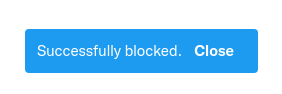
You may need to refresh the page if you want to check the effects immediately.
Notice
- Blocking too many users in a 15-minute interval may cause you automatically logged out. For More details you may click here.
- This userscript cannot block users who have blocked you or whose accounts are set private.
- This userscript does not support leaving out your followings or followers when blocking.
- The blocking operation CANNOT BE UNDONE. Think twice before blocking and consider whether you really need to block that group of users.
Feedback
- If you like this script, you can recommend it to your friends, rate it on Greasyfork, and go to the Github repo page and give me a star!
- Feel free to open an issue on Github if you find any bugs or have any questions or suggestions.
Ocena: 0