max / 解除网页限制
Install steps: Install a userscript manager, select Install, then open a website matched by the script.
Source and freshness
The following figures come from the original source and are separate from activity on this site.
Original script: 解除网页限制
Source version: 2.4.2
Last source check:
Last successful check:
- Source daily installs
- 0
- Source total installs
- 0
- OpenUserJS install requests
- 0
Requests received by this site are not proof that a user completed installation.
Clicking Install records a request on this site; it does not confirm installation. Not working after install? View troubleshooting and issues
The script gave up maintaining on greasyfork and will be transferred to github gh-pages for release and update
该脚本放弃在 greasyfork 上维护,将转移到 github gh-pages 发布和更新
https://github.com/rxliuli/userjs/blob/master/apps/unblock-web-restrictions/README.zhCN.md
Unblock web restrictions
Introduction
The reason why this script is written is that it is very inconvenient to add / disable the domain name in the existing UserJS script, so write one myself, which is convenient for my generation to use.
Features
- Force selection / copy / paste
- Disable the small tail when copying web pages
- Allows quick enable / disable through the menu (main improvements)
- Dynamic update support domain name list (main improvements)
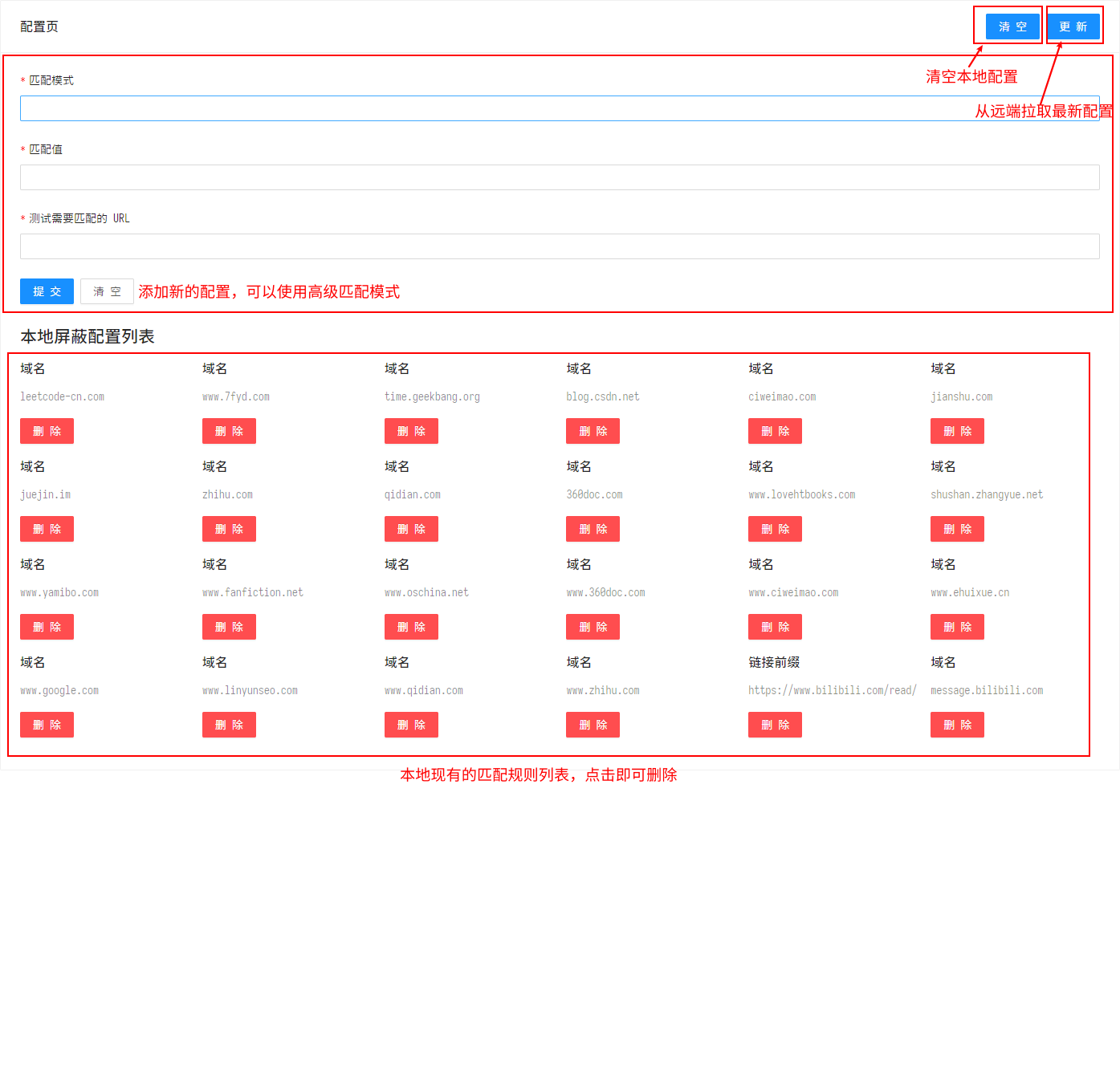
- Advanced matching mode
Advanced Matching Mode
This is a more powerful feature, not only matching domain names, but also matching urls, url prefixes, and regular expressions.
Help
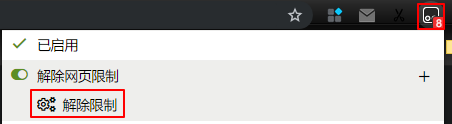
If you find a domain name that is not yet supported, you can click Tampermonkey => Unblock web restrictions => Unlock Restrictions to take effect, or, put it on GitHub Issues so that everyone can update the domain name to lift the restriction.
FAQ
Script not working
There are many reasons for this issue, some common ones include
- Using transparent images or div masks -- usually solved by removing the corresponding element using user.css/js
- Using custom fonts to replace the displayed text with the actual text -- find the font mapping rules and parse them back
The following need to use OCR technology to solve the problem, which is painful for web developers and users alike
- Custom text typography rules, making it difficult to select text
- Use canvas to draw the text on
- Render text as image on server side, client side only gets image
Shortcuts on web pages don't work anymore
Yes, because the script overrides the following shortcuts, c-c/v/x/a, and possibly some drag-and-drop related shortcuts via ctrl + mouse.
The functionality of the site itself is affected
In fact, the script currently limits the impact to as little as possible, but there is no guarantee that there will be no conflicts with the site (see the previous article), so if something goes wrong, please raise it directly in GitHub Issues.
Ocena: 0