max / searchEngineJump 搜索引擎快捷跳转
Install steps: Install a userscript manager, select Install, then open a website matched by the script.
Howto per principianti con script utente Chrome Edge Firefox
Source and freshness
The following figures come from the original source and are separate from activity on this site.
Original script: searchEngineJump 搜索引擎快捷跳转
Source version: 5.26.11
Last source check:
Last successful check:
- Source daily installs
- 6
- Source total installs
- 183348
- Source rating
- 97.1
- OpenUserJS install requests
- 31
Requests received by this site are not proof that a user completed installation.
Clicking Install records a request on this site; it does not confirm installation. Not working after install? View troubleshooting and issues
修改自脚本 searchEngineJump modified version from NLF 4.0.5.3
- 增加设置菜单(见下图设置菜单):
- 自行 开关搜索列表,拖动搜索可以进行排序,拖动标题可以列表之间排序
一、自定义搜索
关于自定义添加搜索: 添加完后,如需移动,禁用,删除的需要 “保存并关闭” 然后在设置。 目前无容错能力,不会去判断输入的是否正确,全留空也可以添加成功。 以 “360 搜索” 为例
标题:标题自定义,无要求,建议别太长。-
链接: 这个是最重要的
- 2.1,使用 so.com 搜索
360后,网址为https://www.so.com/s?ie=utf-8&fr=so.com&src=home_so.com&q=360 - 2.2,需要将搜索的内容
360替换 为%s,这个就是将要填的链接。此例中链接为https://www.so.com/s?ie=utf-8&fr=so.com&src=home_so.com&q=%s
图标:可以给个图片连接又或者给 base64 编码的图片,默认则根据上面的搜索连接获取图片。默认即可打开方式:对于当前这个搜索链接的打开方式,默认即可例(见下图设置):
- 标题:360
- 连接:https://www.so.com/s?ie=utf-8&fr=so.com&src=home_so.com&q=%s
- 图标:
- 打开方式:新标签页打开
二、已知问题:
1.乱码的问题:
- 目前已知的一种情况, 是因为使用了
TamperMonkey(测试时最新版是v4.16.1 )的导入导出功能, 选择文件 - 导出功能时, 再次导入就会出现乱码的问题, 如果使用压缩包的导出功能, 则不会出现乱码。 但这种情况的乱码可以通过 脚本的设置 - 更多设置 - 配置文件 - 清空设置恢复到默认搜索列表。 - 相关用户的反馈 searchEngineJump 搜索引擎快捷跳转 - 反馈 (greasyfork.org)
- 不排除还有其他乱码的问题, 因为曾经有用户反馈即使通过
设置中清空设置也无法解决乱码问题, 只能删除重新安装解决。 - 目前最好的解决方法应该是: 不使用
文件 - 导出功能, 而使用它的压缩包 - 导出
2.关于兼容问题
- 和脚本 "AC-baidu - 重定向优化百度搜狗谷歌必应搜索favicon双列 " 的兼容问题
- 如果这两个脚本同时使用, 可以打开该脚本的 “设置 (齿轮) - 居中 - 强制 ”, 可以实现两个脚本共存, 否则会出现下拉菜单偏移的问题。 与之带来的问题是: 在百度页面滚动时无法固定搜索栏, 后续修复
3.跳转栏突然消失的情况:
- 解决方法:重新安装(一般情况)
- 原因:由于设置菜单里面的一些逻辑缺陷,包括不会判断所有的设置数据是否合法,导致保存了非法的数据,再次读取数据时,因为无法正常解析导致程序终止。
4.其他问题
- 与脚本网页解除限制有冲突,开启后,无法进行跳转。可以暂时先用我修改后的网页解除限制(改), 或者自己修改下原作者的脚本,, 使用 exclude 排除相关网页。
-
拖动排序和有些拖拽手势插件冲突 (原因未知)。若在使用中出现此问题,拖拽手势插件一般按 ctrl 忽视手势。 - 在奔跑的奶酪定制版火狐浏览器 RunningCheese Firefox V8 中,设置菜单会出现错位的现象,导致设置无法正常使用。
- 360 极速浏览器中 (?360 安全浏览器), 在 360 搜索(so.com) 的页面无法显示跳转栏。
三、排除网站
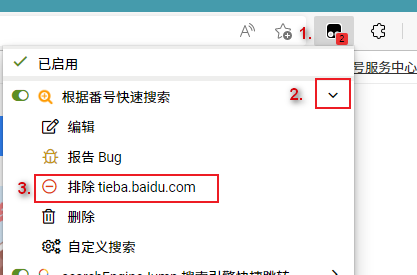
- 自 version 5.26.0 2022-11-03 后, 脚本会在所有网站运行, 但是某些网站中可能并不可靠, 例如在 mega 中, 你可以按照下图类似的方法进行排除相关网站
- 如果不需要划词搜索, 可以在设置菜单中直接关闭滑词搜索
设置 - 更多设置 - 划词搜索。
若有什么建议或在使用中出现了问题,欢迎各位在 反馈 中提出来
四、更新日志
详细更新日志见 GitHub
version 5.24.6 2022-07-03
- 修复: 开启 "AC-baidu - 重定向优化百度搜狗谷歌必应搜索 favicon 双列 " 脚本后, 百度页面下拉菜单偏移的问题, 但是需要手动开启, 开启方法: 菜单 - 居中 - 强制 。由于该脚本会延迟加载, 导致以前用的自动获取失效, 如果两个脚本同时启用, 务必在 “菜单” 中将 “居中” 改为“强制”。
version 5.23.0 2020-12-19
- 修复: 一个严重影响脚本运行的问题, 重新导入配置后, 脚本很大几率加载错误的问题
- 修复: 百度文库
- 增加: 购物网站亚马逊
- 优化: 有道搜索 startpage
- 优化: 不再匹配所有网站, 只匹配相关网站
- 界面: 百度图标, B 站图标
version 5.20.0 2020-01-27
- 增加一键搜索。点击该搜索分类的图标后,会在后台打开该分类所有的搜索网站进行搜索。在设置中开启与关闭
- 感谢 感谢所有下载和使用的用户。近一年的不更新,感谢各位不离不弃
version 5.13.0 2017-12-11
- 修改之前的排序方式,使排序更直观易用
version 5.2.0 2017-05-20
- 自定义添加搜索引擎
version 5.0.0.0 2017-05-08
- 添加设置
- 由于是大改,所以可能有些问题会出现


Valutazione: 97.1