max / Bilibili 免登入顯示留言
Install steps: Install a userscript manager, select Install, then open a website matched by the script.
Howto per principianti con script utente Chrome Edge Firefox
Source and freshness
The following figures come from the original source and are separate from activity on this site.
Original script: Bilibili 免登录加载评论
Source version: 1.0.2
Last source check:
Last successful check:
- Source daily installs
- 0
- Source total installs
- 0
- OpenUserJS install requests
- 0
Requests received by this site are not proof that a user completed installation.
Clicking Install records a request on this site; it does not confirm installation. Not working after install? View troubleshooting and issues
Bilibili 免登入顯示留言
在未登入 Bilibili 帳號的情況下,官方預設僅允許載入兩條回覆。
本腳本解除該限制,讓您無須登入即可正常閱讀、排序與瀏覽完整留言及二級子評論!
透過官方公開 API 與 WBI 簽名機制,原汁原味還原原生風格的評論區體驗。
✨ 核心特色
- 🔓 免登入暢讀:無需登入帳號,自動獲取並渲染主評論與子評論
- 🎨 原生級 UI 還原:
- 完美還原官方字型、顏色、徽章排版及深淺色階
- 支援粉絲勳章、頭像框、大航海(艦長/提督/總督)裝飾卡片、大會員粉色暱稱、認證藍/黃 V 等標誌
01:23),點擊即可直達影片進度並自動播放Viewer.js,支援評論圖片原圖預覽、縮放與拖曳- 切換「無限滾動載入」或「分頁器模式」
- 支援一鍵展開/載入所有子評論
- 自訂開關頭像框、粉絲牌、航海卡片、關鍵字搜尋標籤等外觀元素
🌐 支援頁面
| 頁面類型 | 網址規則 | 支援狀態 |
|---|---|---|
| 一般影片 | https://www.bilibili.com/video/* |
✅ |
| 番劇 / 動漫 / 電影 | https://www.bilibili.com/bangumi/play/* |
✅ |
| 動態 | https://t.bilibili.com/* |
✅ |
| 專欄 (Opus) | https://www.bilibili.com/opus/* |
✅ |
| 個人空間 | https://space.bilibili.com/* |
✅ |
| 專欄文章 (cv) | https://www.bilibili.com/read/cv* |
✅ |
| 活動 / 節日頁面 | https://www.bilibili.com/festival* |
✅ |
| 播放清單 (List) | https://www.bilibili.com/list/* |
✅ |
| 漫畫詳情 / 閱讀器 | https://manga.bilibili.com/* |
✅ |
備註:當檢測到已登入(Cookie 中包含
bili_jct或登入狀態為真)時,本腳本會自動停止執行,把控制權交還給 B 站原生模組,不影響帳號正常功能。
🛠️ 設定與自訂
進入任何支援頁面後,你可以透過以下兩種途徑開啟設定視窗:
- 點擊評論發表框左側的 「齒輪圖示」
- 點擊瀏覽器擴充功能列中的 Tampermonkey 圖示 ➔ 選擇 「自定義設置」
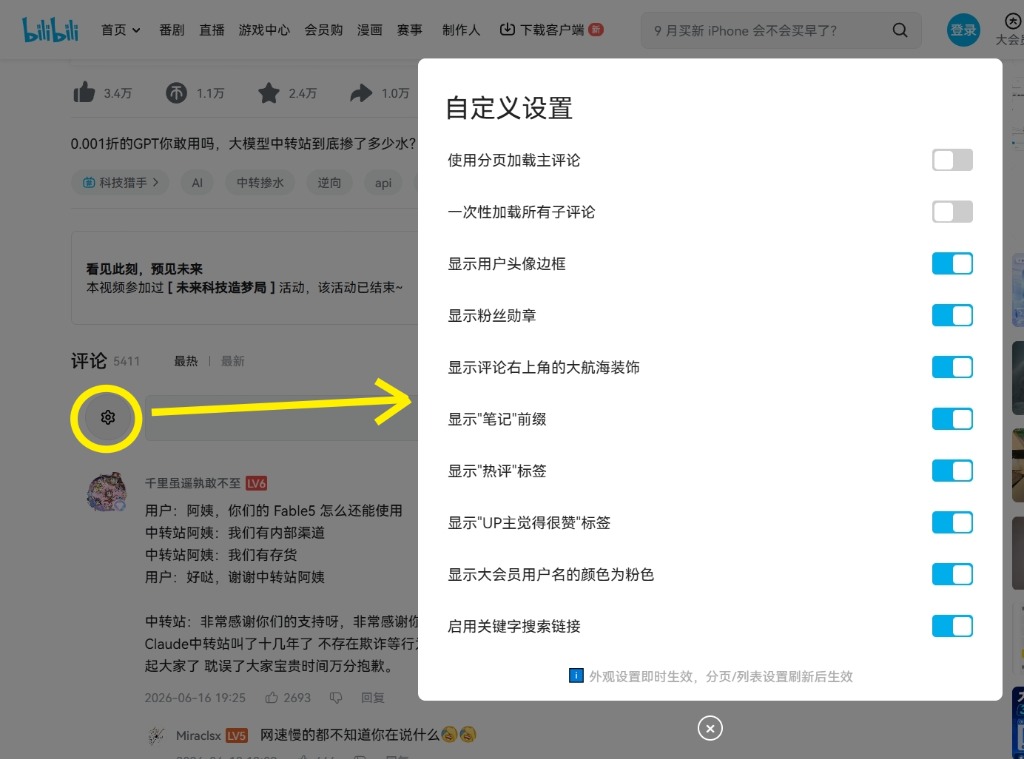
▲ 評論區齒輪按鈕與彈出式設定面板
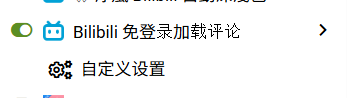
▲ 油猴腳本選單中的「自定義設置」入口
可配置項目清單
| 設定項 | 預設值 | 說明 | 生效時機 |
|---|---|---|---|
| 使用分頁加載主評論 | 關閉 | 開啟後主評論將改用數字分頁切換,關閉則為無限滾動加載 | 重新整理頁面後 |
| 一次性加載所有子評論 | 關閉 | 展開二級回覆時是否一次性輪詢拉取全部評論 | 重新整理頁面後 |
| 顯示用戶頭像邊框 | 開啟 | 顯示用戶客製化裝扮頭像框 | 即時生效 |
| 顯示粉絲勳章 | 開啟 | 顯示用戶佩戴的實況主粉絲徽章及等級 | 即時生效 |
| 顯示右上角大航海裝飾 | 開啟 | 顯示艦長、提督、總督專屬身份卡片 | 即時生效 |
| 顯示「筆記」前綴 | 開啟 | 標記發布圖文筆記的標籤 | 即時生效 |
| 顯示「熱評」標籤 | 開啟 | 標記熱門回覆標籤 | 即時生效 |
| 顯示「UP主覺得很贊」標籤 | 開啟 | 標記獲得創作者按讚之標籤 | 即時生效 |
| 顯示大會員用戶名為粉色 | 開啟 | 還原大會員專屬粉色暱稱外觀 | 即時生效 |
| 啟用關鍵字搜尋連結 | 開啟 | 解析留言內提及的關鍵字與熱搜搜尋跳轉點 | 重新整理頁面後 |
⚠️ 常見問題與注意事項
- 為什麼看到「UP主已關閉評論區」或「無法從 API 獲取評論」?
- 部分稿件創作者主動關閉了評論互動功能;或遇 Bilibili 官方 API 網路波動,請嘗試重新整理頁面。
- 不會。腳本具備登入偵測機制,若已登入將完全交由 B 站官方原生腳本接管。
- 請前往 GreasyFork 反饋區 或 GitHub Issues 提交反饋,並附上出問題的頁面網址與瀏覽器主控台(F12 Console)錯誤截圖。
🤝 致謝與宣告 (Credits & License)
- 作者:DoReMi (@pthuang01)
- 原始作者與原型:感謝原作者 DD1969 的開源貢獻與原始核心架構。本腳本為其衍生分支版本,專注於現代模組化架構重構、SPA 穩定性提升與原生 UI(如大航海漸層卡片、排版切齊)的深度還原修復。
- 原始碼倉庫:GitHub - bilibili-login-free-comments
- 開源協議:GPL-3.0 License
Valutazione: 0