max / AO3: Advanced Blocker
Install steps: Install a userscript manager, select Install, then open a website matched by the script.
Source and freshness
The following figures come from the original source and are separate from activity on this site.
Original script: AO3: Advanced Blocker
Source version: 4.2.4
Last source check:
Last successful check:
- Source daily installs
- 0
- Source total installs
- 0
- OpenUserJS install requests
- 0
Requests received by this site are not proof that a user completed installation.
Clicking Install records a request on this site; it does not confirm installation. Not working after install? View troubleshooting and issues
AO3: Advanced Blocker

Block works on AO3 by tags, authors, titles, summaries, word counts, and more. Filter by completion status, language, last update, and primary pairings. Customize what you see—or don't.
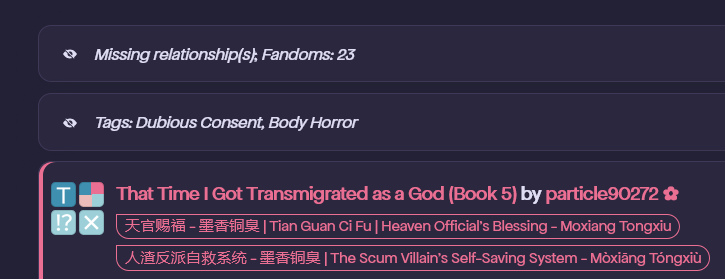
✨ Features
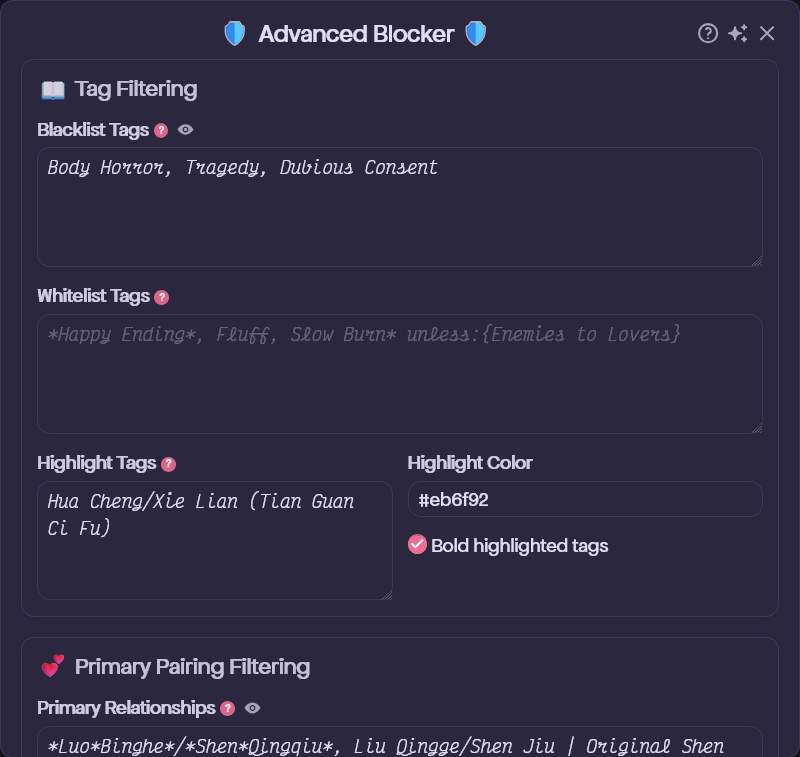
Tag Filtering
- Blacklist Tags – Hide works containing specific tags (ratings, warnings, fandoms, ships, characters, freeforms, and more).
- Strict Blacklist Tags – Hide works completely, with no clickable placeholder—for your absolute deal-breakers. (Requires Strict Tag Blocking to be enabled.)
- Whitelist Tags – Always show a work, even if it matches the blacklist.
- Highlight Tags – Make works with chosen tags stand out in a custom color, optionally with bold tags.
- Wildcard Support – Use
*to match partial tags. For example,Abandoned*matches "Abandoned Work" and "Abandoned WIP." - Conditional Blocking – Block tags based on the presence or absence of other tags:
unless:{tag}– Block unless the condition tag is present. Example:F/M unless:{Multi}blocks F/M works that aren't also tagged Multi.with:{tag}– Block only if the condition tag is present. Example:Major Character Death with:{Unhappy Ending}blocks Major Character Death only when Unhappy Ending is also tagged.- Multi-condition – Combine tags inside braces using
,for AND or||for OR. Example:Angst unless:{Happy Ending, Fluff}blocks Angst unless both Happy Ending and Fluff are present.
Content Filtering
- Author Blacklist – Block works by specific authors. Match the full pseud (not a fragment); capitalization doesn't matter.
- Title Blacklist – Hide works whose titles contain specific words or phrases.
- Summary Blacklist – Hide works whose summaries contain specific words or phrases.
- Work Blacklist – Block individual works by ID.
Alt + Clicka work's title to add it automatically.
Work Metadata Filtering
- Word Count Limits – Set minimum and maximum word counts.
- Chapter Limits – Filter by chapter count (handy for hiding one-shots or avoiding epic-length works).
- Language Filter – Show only works in your chosen languages.
- Fandom Limit – Hide works tagged with more fandoms than your threshold (useful for blocking crossovers).
- Staleness Filter – Hide ongoing works that haven't updated in X months.
- Block Complete / Ongoing – Hide works based on their completion status.
Primary Pairing & Character Filtering
- Primary Relationships – Show only works where one of your chosen relationships appears in the first few relationship tags.
- Primary Characters – Show only works where one of your chosen characters appears in the first few character tags.
- Tag Window – Set how many tags to check from the top for each filter (default: 1 for relationships, 5 for characters).
Display Options
- Show / Hide Block Reasons – See exactly why a work was blocked, or just show "Hidden by filters."
- Work Placeholders – Blocked works appear as clickable stubs you can reveal, or disappear entirely.
- Per-Filter Hide Completely – Click the eye icon (👁️) next to any filter to hide its matches entirely, bypassing placeholders.
- Disable on My Content – Skip blocking and filtering on your own profile pages entirely.
Convenience Features
- Quick-Add – Hold a customizable key (default: Alt) and click any tag, author name, or work title to add it to your blacklist instantly. With Strict Tag Blocking enabled, hold Shift + Alt to add to the strict blacklist instead.
- Pause Blocking – Temporarily disable all filtering without changing your settings.
- Import / Export Settings – Save and restore your configuration across devices or browsers.
📋 How to Use
⚠️ Important for Chromium-based browsers: On Chrome, Brave, Vivaldi, or Microsoft Edge (PC), an extra activation step is required. Follow these instructions. For the Tampermonkey iOS app, see this video.
- Install a userscript manager such as Tampermonkey:
💾 Backup Your Settings
- Export Settings – Download your configuration as a timestamped JSON file for backup or transfer.
- Import Settings – Upload a previously exported JSON file to restore your customizations.
- Reset to Defaults – Restore all settings to their original values.
💡 Tip — Sync your blocklist across devices: If you use AO3 on more than one device, AO3: Script Sync keeps your Advanced Blocker settings and blocklists in sync automatically using Google Sheets.
⚙️ Settings Guide
Wildcard Syntax
- Use
*to match any sequence of characters (zero or more) in tag, title, and summary blacklists. - The
*acts as a placeholder—it can match letters, spaces, punctuation, or nothing at all. - Examples:
Abandoned*matches: Abandoned, Abandoned Work, Abandoned WIP*Fix*matches: Fix-It, Fix-It of Sorts, Time Travel Fix-ItSelf*Insert*matches: Self-Insert, Self-Insert Player, Self...Insert (with anything in between)*Angstmatches: Angst, Major Angst, Fluff and Angst
Conditional Blocking Syntax
- Use
Tag unless:{ConditionTag}orTag with:{ConditionTag}to create smart filters. - Works in both the tag blacklist and the whitelist.
- unless – Blocks when the condition tag is not present (blocks unless the condition exists).
- with – Blocks when the condition tag is present (blocks only with the condition).
- Wildcards are supported in both the main tag and the condition tag.
- Multi-condition – Combine tags inside
{}with AND (,) or OR (||) logic:
{Happy Ending, Fluff}– AND: all tags must match.{Fluff||Hurt/Comfort}– OR: any tag must match.
Angst unless:{*Fluff}– Blocks angsty works that don't have any kind of fluff.F/M unless:{Multi||M/M||F/F}– Blocks F/M works that aren't also tagged Multi, M/M, or F/F.*Whump with:{Hurt No Comfort}– Blocks any whump tag when Hurt No Comfort is present.Major Character Death with:{Unhappy Ending}– Blocks Major Character Death only when it's also tagged Unhappy Ending.Explicit with:{Dead Dove: Do Not Eat, Dubious Consent}– Blocks Explicit works only when they also have both Dead Dove: Do Not Eat and Dubious Consent.Angst unless:{*Happy*Ending*}– Blocks Angst works unless they have a tag containing "Happy...Ending" (e.g., "Happy Ending," "Eventual Happy Ending").
Strict vs. Regular Tag Blocking
- Blacklist Tags – Show a placeholder that can be clicked to reveal the blocked work (or use the eye toggle to hide it completely).
- Strict Blacklist Tags – Always hide works completely, with no placeholder—keeping mild dislikes separate from absolute deal-breakers.
- Example: blacklist "Angst" normally (you don't prefer it but will check occasionally) and strict-blacklist "Major Character Death" (you never want to see it).
- Enable Strict Tag Blocking in Display Options to split your blacklist into these two categories.
- Quick-add: Alt + Click adds to the regular blacklist; Shift + Alt + Click adds to the strict blacklist.
Hide Completely Toggles
- Every filter has an eye icon (👁️) next to its input field. Click it to switch between showing a placeholder (which can be clicked to reveal the blocked work) and hiding the work completely. This gives you fine-grained control over how each type of block is displayed.
Primary Relationships & Characters
- Enter names exactly as they appear on AO3, including alternative names:
Luo Binghe/Shen Yuan | Shen Qingqiu. - The Tag Window settings check only the first X tags (default: 1 for relationships, 5 for characters).
- Wildcards and limited conditional logic are supported. Use
with:{Fandom}orwith:{Fandom1||Fandom2}to limit a rule to specific fandoms. - Relationship examples:
Harry Potter/Tom Riddle with:{Harry Potter - J. K. Rowling}– Requires this ship within the tag window, but only blocks works in the Harry Potter fandom that lack it.Harry Potter/*or*/Harry Potter*– Allows Harry Potter to be shipped with anyone.*Harry Potter*– Allows all relationship tags involving Harry Potter, including platonic ones (e.g.,Harry Potter & Sirius Black).
Luo Binghe with:{人渣反派自救系统 - 墨香铜臭 | The Scum Villain's Self-Saving System - Mòxiāng Tóngxiù}– Requires Luo Binghe within the tag window, but only blocks works in the SVSSS fandom.*Luo Binghe– Matches all versions of Luo Binghe, including Original Luo Binghe, Ancestor Luo Binghe, and so on.
Note — using AO3: Reorder Ship Tags? The Tag Window reads the original tag order set by the author, not the reordered version.
Language Filter
- Enter language names exactly as they appear on AO3:
English,Русский,中文-普通话国语.
🙌 Credits
Big thanks to AO3 Blocker by Jaceboy and AO3 Savior by tuff. Also, many thanks to the amazing AO3 Enhancements extension by jsmnbon.
📜 Check Out My Other Scripts
- AO3: Quick Hide – Quickly hide works, bookmarks, and comments while browsing AO3.
- AO3: Custom Favorites – Replace AO3's "Find your favorites" with custom shortcuts to any page.
- AO3: Reading Time & Quality Score – See reading time and engagement scores at a glance.
- AO3: Script Sync – Sync AO3 userscript settings and data across multiple devices.
- AO3: Site Wizard – Customize fonts, sizes, and work spacing site-wide.
- AO3: Skin Switcher – Quickly switch between AO3 site skins.
- AO3: Chapter Shortcuts – Quick links to the latest chapter of any work.
- AO3: No Re-Kudos – Prevent accidentally re-kudosing works.
- AO3: Reorder Ship Tags – Automatically reorder romantic ships (/) before platonic ships (&).
- AO3: Auto Pseud – Auto-select pseuds based on fandom when commenting and bookmarking.
Értékelés: 0