max / VOD Highlight Analyzer
Install steps: Install a userscript manager, select Install, then open a website matched by the script.
HOWTO pour débutants en script utilisateur Chrome Edge Firefox
Source and freshness
The following figures come from the original source and are separate from activity on this site.
Original script: YouTube & Twitch VOD Highlight Analyzer
Source version: 1.2
Last source check:
Last successful check:
- Source daily installs
- 0
- Source total installs
- 0
- OpenUserJS install requests
- 0
Requests received by this site are not proof that a user completed installation.
Clicking Install records a request on this site; it does not confirm installation. Not working after install? View troubleshooting and issues
YouTube, Twitch & Kick VOD Highlight Analyzer
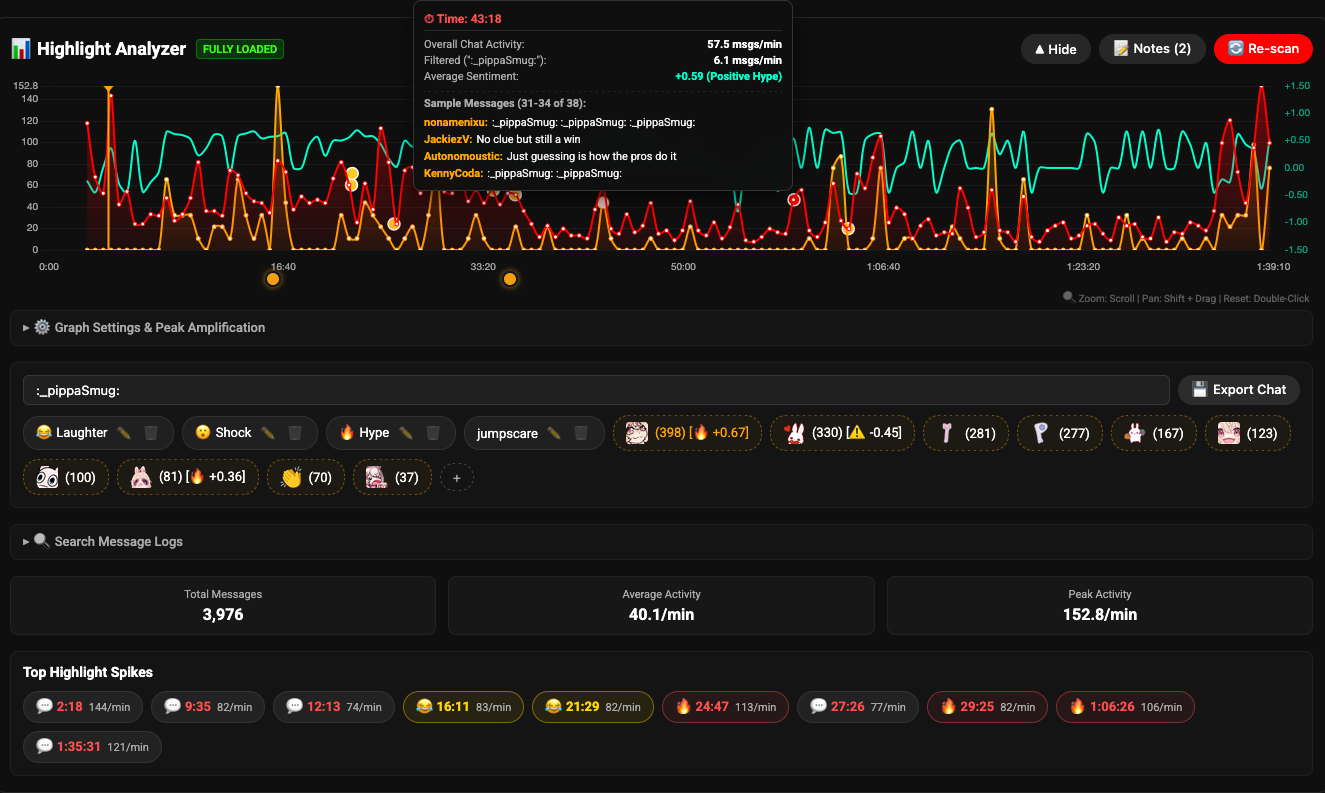
Watching a long stream recording and wondering where the best moments are? This script reads the chat replay and puts an activity chart right under the video player. When something funny, hype, or unexpected happens, chat messages spike. Just click any peak on the graph to jump straight to the action.
What It Does
- Click to jump: Click anywhere on the graph to skip straight to that timestamp. You can also turn on auto-seek, which drops you into the quiet build-up right before the hype starts.
- Highlight buttons: The script automatically spots the biggest chat spikes and turns them into quick-jump buttons below the graph. Right-click any button to remove it and show the next biggest peak.
- Zoom and pan: Scroll your mouse wheel or pinch your trackpad to zoom in on busy sections of the stream. Hold Shift and drag to scroll left or right, and double-click anywhere on the chart to zoom back out.
- Works on YouTube, Twitch, and Kick: Runs on all three platforms, handling their different video players and layouts automatically.
- Mood and sentiment curve: An optional line tracks the overall vibe of chat, showing whether viewers were laughing, celebrating, or malding throughout the stream.
- Keyword filters and spam blacklist: Filter the graph for specific words or popular emotes (like KEKW, LUL, or Pog). You can also add words to a blacklist to ignore bots and copypastas.
- Super Chat markers (YouTube): Highlights paid Super Chats on the timeline with color-coded dots. Hover over a dot to see who donated, how much, and what they said.
- Searchable chat log: Look up quotes, usernames, or specific moments in the built-in search box, then click the timestamp next to any message to jump right to it.
- Timeline notes and bookmarks: Click Add Note at any time during the stream to place a marker dot right below the graph. Hover over the dot to write or edit your note, and click it anytime to jump back to that moment.
- Saves your scans: Once you scan a VOD, the data is saved in your browser storage so it loads right away if you come back later.
- Export to CSV: Need the chat logs for video editing or archiving? Click Export Chat to download the full chat history.
Quick Controls
- Zoom: Scroll mouse wheel or pinch trackpad
- Pan: Hold Shift and click-drag
- Reset zoom: Double-click on the graph
- Dismiss a highlight: Right-click on any highlight pill to see the next highest moment
- Inspect comments: Hover over any spot on the graph to see a sample of messages sent at that second
- Bookmark a moment: Click Add Note to drop a dot under the graph, hover over it to type, or click it to jump back
How to Install
- Install a userscript manager in your browser (Tampermonkey is recommended).
- Install the
youtube_highlight_analyzer.jsscript. - Open any VOD on YouTube, Twitch, or Kick.
- Click Load Chat below the player to start scanning.
Note: 0