max / Google Search Direct Links (Bypass /goto)
Install steps: Install a userscript manager, select Install, then open a website matched by the script.
Source and freshness
The following figures come from the original source and are separate from activity on this site.
Original script: Google Search Direct Links (Bypass /goto)
Source version: 0.2.0
Last source check:
Last successful check:
- Source daily installs
- 0
- Source total installs
- 0
- OpenUserJS install requests
- 0
Requests received by this site are not proof that a user completed installation.
Clicking Install records a request on this site; it does not confirm installation. Not working after install? View troubleshooting and issues
Google Search Direct Links (Bypass /goto)
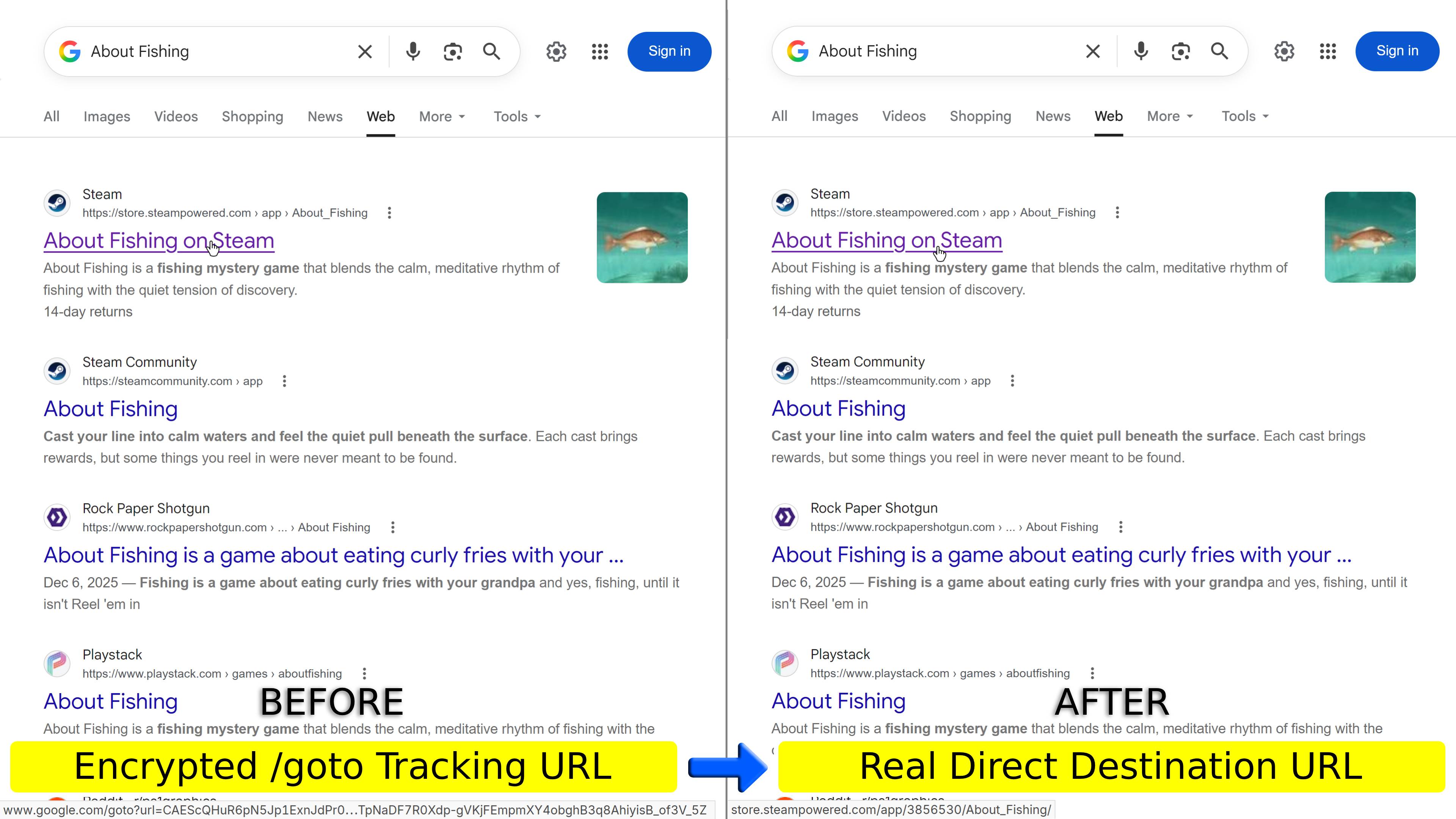
Bypasses /goto redirects and cleans tracking parameters in Google Search.
The script remains 100% offline locally by default, supporting local direct link restoration for Google Images, Google Lens ("Visual matches"), Google Scholar, and traditional redirects. To restore authentic direct links for standard search results (All, Web, etc.), you must use Tampermonkey and manually enable "Network Resolution Mode".
⚠️ Important Instructions
Restoring standard results requires Tampermonkey and manual opt-in of Network Resolution
• Manager Limitations: Google no longer provides authentic URLs in frontend data. Currently, only Tampermonkey supportsredirect: 'manual'to read HTTP 302 headers in the background; other managers cannot restore direct links (Violentmonkey has not implemented it yet Issue #2359; ScriptCat is also unsupported due to browser Fetch header restrictions).
• 100% Offline by Default: To protect privacy, no background network requests are sent without consent.
• How to Enable: Click the Tampermonkey toolbar icon ➔ "⚙️ Settings Panel" ➔ Enable "Network Resolution Mode" (confirmation dialog included).
Background & Issues
Starting in July 2026, Google began testing randomized /goto?url=... redirect tokens on search results and progressively stopped providing authentic destination URLs in frontend data (HTML/JS) for standard results, causing several issues:
- Obscured URLs: Prevents direct inspection and copying of clean target links.
- Broken
:visitedHistory: Randomized tokens prevent browsers from matching history, breaking native purple visited link indicators. - Ecosystem Tools Disrupted: Domain filter extensions (e.g. uBlacklist, Indie Wiki Buddy, Google Hit Hider by Domain) have updated to rely on breadcrumbs as a workaround, but their coverage is limited; userscripts like Better Google (
a.btrLink,<cite>) and Gplex (custom green URL text) also have their links replaced with/goto.
🔗 Reference Articles & Technical Discussions (Click to expand)Common Triggers: Logged-out browsing and Incognito mode across "All", "Web", "News", "Images", "Google Lens", "Videos", "Shorts", "Forums", and "AI Mode" tabs.
- Google Search Rolling Out google.com/goto Tracking Parameters (Search Engine Roundtable, August 2026)
- google.com/goto: Google's anti-scraping update (Hacker News)
- Extension seems badly broken after a recent change to Google (google.com/goto?url) (Rob--W/dont-track-me-google #67)
- New google research result sometimes use
/goto?url=relative link, and it breaks this extension silently (iorate/ublacklist #1025) - Google search filtering now broken for non-logged in users due to passthrough URL (IndieWikiBuddy/indie-wiki-buddy #1678)
To record Google SERP mechanism changes and the script's technical evolution, key milestones are summarized below:
- July 2026 (Initial Canary Testing):
Google began small-scale canary rollouts in logged-out and Incognito modes, randomly testing/goto?url=...redirect tokens on search results. - August 15, 2026 – September 9, 2026 (Frontend Data Resolvable Stage):
Google expanded/gototesting. During this period, the script was able to rely on frontend data (HTML attributes, JavaScript variables likeW_jd, Protobuf payload decoding, and embedded comments) to restore most/gotolinks locally (except for the "News" category, which never exposed raw destination URLs in frontend data). - September 9, 2026 (Architecture Update: Raw URLs Withdrawn from Frontend):
Google updated its architecture, removing authentic destination URLs from frontend data (HTML/JS) for standard search results ("All", "Web", "Forums"). The script transitioned to supporting Tampermonkey's "Network Resolution Mode" to restore direct links via HTTP 302 headers. - September 14, 2026 (Server-Side Token Coverage Expanded):
Google expanded server-side/gototokens across "Videos" (udm=7) and "Short videos" (udm=39). Currently, only "Google Images" (udm=2,data-lpage) and Google Lens "Visual matches" (udm=26) retain frontend data for local direct link restoration; all other categories require enabling "Network Resolution Mode" to restore direct destination URLs.
Operating Modes & Support Coverage (v0.2.2)
This script operates in an adaptive dual-mode architecture:
- Local Static Mode (Default): Operates 100% offline, universally compatible across all userscript managers. Supports local direct link restoration for traditional redirects, Google Scholar, Google Images, and Lens Visual matches, alongside comprehensive parameter sanitization.
- Network Resolution Mode (Manual Opt-in): Requires Tampermonkey 4.19.0+. Reads background HTTP 302 headers to restore authentic direct links across standard search results and all categories.
📊 Category Support Matrix
| Search Category | Local Static Mode (Default) | Network Resolution Mode (Tampermonkey) | Notes |
|---|---|---|---|
All / Web (udm=web) |
❌ Retains /goto links |
✅ Restores authentic direct links | Frontend data lacks authentic URLs; requires network resolution to restore direct links. Parameter sanitization applied locally. |
News (tbm=nws) |
❌ Retains /goto links |
✅ Restores authentic direct links | Frontend data lacks authentic URLs; requires network resolution to restore direct links. Parameter sanitization applied locally. |
Forums (udm=18) |
❌ Retains /goto links |
✅ Restores authentic direct links | Frontend data lacks authentic URLs; all forum results (including deep discussion thread URLs) require network resolution to restore direct links. |
Images (udm=2) |
🟢 Directly restored locally | 🟢 Directly restored locally | Extracts destination and full-size image URLs directly from data-lpage (zero network traffic). |
Videos / Short videos (udm=7/39) |
❌ Retains /goto links |
✅ Restores authentic direct links | Frontend data lacks authentic URLs; requires network resolution to restore direct links. |
Google Lens (udm=26) |
🟢 Visual matches restored locally | ✅ Restores authentic direct links | "Visual matches" results retain frontend data and can be restored locally; other Lens result types require network resolution. |
| AI Overview | ❌ Retains /goto links |
✅ Restores authentic direct links | Citation cards lack destination URLs; requires network resolution to restore direct links. |
| Google Scholar | 🟢 Directly restored locally | 🟢 Directly restored locally | Instantly decodes /scholar_url?url=... directly to publisher landing pages (zero network traffic). |
Traditional Redirects (/url?, /imgres?) |
🟢 Directly restored locally | 🟢 Directly restored locally | Instantly decodes traditional /url?q=..., /url?url=..., and /imgres?... (zero network traffic). |
Network Resolution Safety Principles & Caveats
⚠️ Key Principles:
- Zero Third-Party Connections: Only queries Google official servers to read HTTP 302
Locationheaders under strict@connectwhitelist; never contacts destination websites. - Rate Limits, CAPTCHA & Search Behavior Tracking Risks: Enabling this feature increases request frequency to Google, which may raise the risk of triggering Google CAPTCHA challenges or search behavior tracking by Google.
- DevTools
net::ERR_ABORTED: Chromium logs an aborted entry when intercepting redirects (< 1ms, 0 bytes, no DNS/TCP handshake); this is normal browser behavior and not an actual error. - Low Overhead & Caching: Transmits ~3.7 KB with ~20–50 ms latency per URL; caches results for 24 hours to prevent redundant requests.
- Concurrency Queue & Circuit Breaker: Employs a 6-worker concurrency queue and an adaptive Circuit Breaker to pause automatically on HTTP 429 or network errors.
- Revocation of v0.1.5: Lacked manager gating, causing non-TM managers to follow redirects to target sites. Revoked via hotfix within 4 hours of release; please use the latest version.
Key Features
- Direct Link Restoration:
- Modern Token Bypass: Bypasses 2026 Google
/goto?url=...redirects and restores browser native:visitedpurple history indicators. - Traditional & Scholar Local Decoding: Instantly decodes traditional Google redirects (
/url?, includingsa=Eredirects), Vertex AI Search, Images (/imgres), and Google Scholar (/scholar_url) locally with zero latency and zero additional network traffic.
- Address Bar: Strips internal telemetry tokens on page load and navigation without page reloads or flickering.
- External Links: Automatically strips marketing tags (
utm_*, etc.), social referral markers (Twitter/X, Instagram, etc.), cross-platform ad click IDs, and modern Google Ads attribution tokens, while strictly preserving functional query parameters and product variants. - Safe Hash / Fragment Sanitization: Losslessly cleans tracking parameters embedded within SPA routes or fragments (e.g.
#/app?utm_source=...), while strictly preserving standard text anchors and pure SPA route paths. - Anti-Click Hijacking: Removes
data-ved,data-sb,ping, andonmousedowntracking attributes.
This script performs lossless parameter sanitization, strictly preserving all functional query parameters, product variants, and URL hash fragments (#hash):
1. External Target Link Tracking & Ad Attribution
- Modern Google Ads Attribution (2023–2026):
gad_source(traffic source identifier),gbraid(iOS 14.5+ app-to-web attribution),wbraid(iOS 14.5+ web-to-web attribution),gad_campaignid(campaign ID),gclaw(AdWords click),gclha(Hotel Ads click). - Universal & Cross-Platform Ad Click Identifiers:
gclid(Google Click ID),gclsrc,dclid(DoubleClick),fbclid(Facebook / Meta),msclkid(Microsoft Bing Ads),twclid(Twitter / X Ads),ttclid(TikTok Ads),ycrid(Yahoo Ads),epik(Pinterest Ads),rdt_cid(Reddit Ads),li_fat_id(LinkedIn Ads). - Social Media Referral & Share Tracking:
ref_src(Twitter / X Referral Source, e.g.twsrc^google|twcamp^serp|twgr^tweet),ref_url(Twitter / X Referral URL),twsrc,twcamp,twgr(Twitter / X traffic, campaign & group markers),igsh,igshid(Instagram Share Tracking IDs). - Retail & Merchant Auto-Tagging:
srsltid(Google Merchant Center auto-tagging). - Campaign Tags (UTM Dynamic Prefix Matching): Matches any parameter starting with
utm_*(includingutm_source,utm_medium,utm_campaign,utm_term,utm_content,utm_id,utm_reader,utm_term_id, etc.). - Analytics, CRM & EDM Tracking:
_ga(Google Analytics cross-domain client ID),_gl(Google Analytics Linker),y_source(Yext / Google Business Profile),mc_cid,mc_eid(Mailchimp Campaign & Email ID),_hsenc,_hsmi(HubSpot Tracking),mkt_tok(Marketo Email Token).
2. Google Search Internal Telemetry & Address Bar Parameters
- Experiment & Security Tokens:
sca_esv,sca_upv(client analytics & experiment signature version),sxsrf(anti-CSRF timestamp token),aep(adaptive experiment parameter),g_ep(Google Experiment Platform version signature). - Click & Navigation Telemetry:
ved(visual element click tracking hierarchy),data-ved,data-sb,ping,onmousedown,rct,rclk(result click marker),ntc(new tab click),csuir,entry(Google Maps entry context). - Logging & Session Identifiers:
ei,sei,psi(search event & page log ID),sstk,mstk(server session tracking key),client,hs,source,sourceid,sclient,gsessionid,lsessionid(Lens session ID),opi(origin page identifier),coh(client operation hash). - Suggestions & Autocomplete Telemetry:
oq(original query string),aqs(address bar query suggestion telemetry),gs_lp,gs_lcrp,gs_lcp,gs_l,gs_ssp,gs_ivs,gs_rn(Google suggest logging, prediction & in-voice telemetry). - Viewport & Hardware Telemetry:
biw(viewport width),bih(viewport height),dpr(device pixel ratio),bshvt(browser session hardware viewport telemetry),bvm(browser view mode),vsdim(visual search dimension). - State, Encoding & Cache Tokens:
prmd,prmdo(Page Result Mode telemetry, e.g.prmd=ivns),pccc(page content cache consistency),si(search intent / knowledge graph traversal),fbs,fbs_id,fbt(filter breadcrumb state),ictx(internal context),cs(client rendering cache),usg(URL signature),qsubts(query submission timestamp),tbnh,tbnw(thumbnail dimensions),authuser(account switcher index),ie,oe(input/output encoding). - Google Scholar Telemetry:
scisig(Scholar redirect cryptographic signature),oi(origin intent marker),ct(click type telemetry),cd(click ranking depth).
3. Strictly Protected Functional Parameters (Zero False-Positives)
- Core Search Functional:
q(search query),udm(search mode),tbm(tab mode),tbs(time & custom filters),start(pagination offset),num(results per page),hl,gl(language & region),safe(SafeSearch),pws(personalization toggle),lr,cr(language/country restrictions),filter,nfpr(spelling correction bypass). - Knowledge Graph & Maps:
stick(compressed entity ID),kgmid(Knowledge Graph machine ID/m/...),ll,z,spn,near,output(coordinates, zoom, viewport span & location query). - Google Scholar Core:
cites(cited article ID),cluster(article version cluster),as_ylo,as_yhi(year range bounds),as_vis(citations toggle),as_sdt,sciodt(database partitions),scisort(sort by date),as_rr(review articles),btnG(search button trigger),user(author profile ID),view_op,citation_for_view(specific paper viewer). - Google Books Reader:
id,dq,pg,lpg(reader page offsets),kptab,printsec,isbn,newbks,newbks_redir,ots,sig(preview authorization signature).
- Dynamic Settings Panel:
- Individual category toggles and network tuning (concurrency 1–8, hover debounce delay, cooldown interval).
- Encapsulated in Shadow DOM, auto-adapting to dark/light themes with keyboard accessibility.
Compatibility & Recommendations
- Userscript Manager Compatibility:
- Tampermonkey (>= 4.19.0): Fully supports local static mode and network resolution mode (via official
redirect: 'manual'specification). - Other Managers (Violentmonkey, ScriptCat, Greasemonkey, etc.): Automatically operate in pure local static mode. Violentmonkey has not implemented redirect control (track Issue #2359); ScriptCat claims support but cannot extract Location headers due to Fetch API
opaqueredirectrestrictions and is practically unsupported. Non-TM managers still provide full local parameter cleansing and Images/Lens direct links.
a.btrLink, <cite>), Gplex URL text and image viewers, and seamlessly coordinating with Google Hit Hider by Domain (Search Filter / Block Sites) for authentic destination domain extraction and microtask DOM mutation re-evaluation.webRequest permissions.@connect whitelist and never contact third-party destination websites. Completely offline when disabled.License
MIT License

هەڵسەنگاندن: 0